
A generated profile file proves that a journey ran. Check the packaged release and its compilation state before attributing a faster launch to that profile.
Measure your app before promising a faster launch. Android Baseline Profiles give the Android Runtime, or ART, a list of code paths for ahead of time compilation, often abbreviated AOT. The value depends on which paths you capture and what dominates the journey. A startup waiting for a remote response can remain slow even when its local code is compiled.
The engineering task has three separate outcomes. The generator records useful paths, the release contains a usable profile, and a controlled benchmark establishes whether that profile helps. Keep evidence for each outcome so a green generation task does not become the entire release check.
All scenarios and command fragments below are hypothetical examples, not executed project instructions or measured results. They use a content feed with a signed in account and fixed local content. Adapt module names and entry points to your app.
Understand what the profiles change
Baseline Profiles guide ART compilation
ART can use shipped rules to compile frequently used methods ahead of time instead of interpreting them and compiling them during use. Coverage can include launch, navigation, and scrolling. The Android Baseline Profiles overview explains this compilation model and how shipped profiles work alongside Cloud Profiles. Measure your own journeys before assigning a benefit or publishing a percentage.
Compilation does not remove application work. Inspect a slow launch trace for initialization, disk reads, and waits. If a network request holds up usable content, decide whether the app can show cached content sooner. Keep those architectural changes separate from a comparison intended to isolate compilation state.
Startup Profiles guide DEX layout
A Startup Profile tells the build tools which startup classes and methods deserve favorable placement in DEX files. A Baseline Profile supplies rules for compilation on the device. Both may come from the same generator, but scrolling through a feed after launch belongs in general runtime coverage.
Set includeInStartupProfile = true for startup collection, leaving it false for later interactions. The Startup Profile guide requires R8 for its layout optimization and documents that DEX layout optimization is enabled by default from AGP 8.3. Include common launch entry points without adding every feature to the startup set.
Establish the toolchain and target variant
Connect the Baseline Profile Gradle plugin and target app
Use Android Studio's Baseline Profile Generator module template for an existing app on AGP 8.2 or later. Select the application module as the target. The official creation guide describes the generated tests and build wiring. Review that wiring before replacing it with configuration from an older tutorial.
The producer is a separate com.android.test module with targetProjectPath = ":app". Apply androidx.baselineprofile to producer and app, then connect the app through baselineProfile(project(":baselineprofile")) in its dependencies. That project path must name the actual producer. A test module that can launch the app is not evidence that its profile reaches the consumer.
The current stable Macrobenchmark dependency is androidx.benchmark:benchmark-macro-junit4:1.5.0, documented in the Benchmark release notes. Keep the Baseline Profile plugin version explicit in the version catalog and use the stable 1.5.0 plugin for this setup. Check compatibility when changing AGP rather than assuming a version change affects only build speed.
Add implementation("androidx.profileinstaller:profileinstaller:1.4.1") to the target app if it is not already declared. The ProfileInstaller release notes document that stable version and its profile capture and installation support. Inspect the resolved dependency and merged manifest if another dependency supplies it transitively.
Separate profile capture from release measurement
Capture against unobfuscated application code so the generated text rules describe recognizable classes and methods. Benchmark the optimized application configuration that consumes those rules. Do not switch off release minification merely to make the generator work.
The plugin creates variants such as nonMinifiedRelease for generation and benchmarkRelease for measurement. Its configuration guide explains these variants and profile merging. Check the selected flavor, application ID, signing, and backend configuration in both modules. A demo feed with a different initialization path may produce a valid profile that misses production startup work.
Prefer profiles per variant when flavors execute different code. Merge only when the shared journey genuinely covers the consumers. Preserve plugin warnings about empty output and disabled variants as actionable failures in your release workflow.
Build and verify an Android Baseline Profile
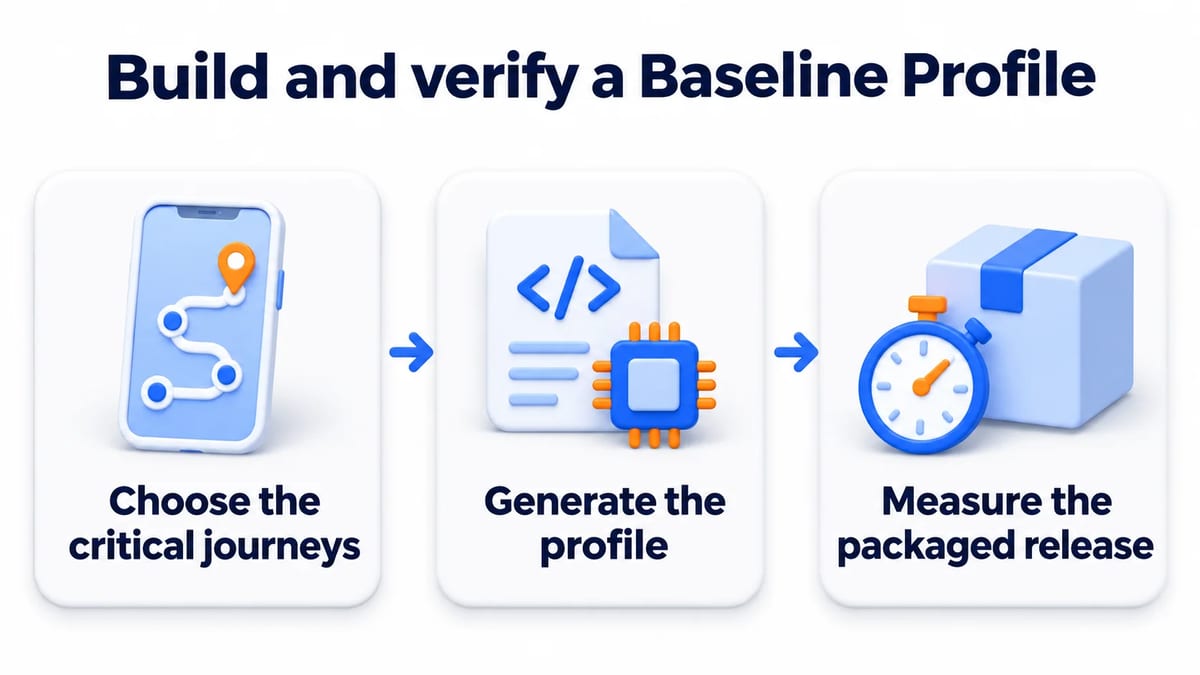
Carry one feed journey through capture and measurement
Choose the critical journeys
Define the start and end state before writing automation. For the feed example, startup begins from the launcher with the app process absent and ends when populated content is usable. The scroll journey begins with that same dataset already displayed and ends after a repeatable gesture sequence. Record account state and cache policy alongside these definitions.
Cover a common returning user launch first, then add another entry point when usage warrants it. Keep onboarding separate if it changes the starting state. A generator that dismisses onboarding opportunistically can capture different paths between runs without failing.
Use UI Automator to drive the external app process and wait for an observable content state. The UI Automator guide documents element predicates and waiting APIs. Prefer stable resource identifiers over translated labels. For Compose, expose suitable test tags through resource IDs where needed. A fixed delay can expire before the feed arrives or waste time after it is ready.
Share journey helpers between collection and benchmark tests. Keep fixture provisioning outside the action being evaluated. The test data management guide explains how to version and reset those inputs. A changed feed length or image cache is a changed workload, even when the gesture code stays identical.
Generate the profile
Collect startup with BaselineProfileRule.collect(packageName = "com.example.feed", includeInStartupProfile = true). Within that collection, launch the app and wait for the agreed content condition. Collect the later scroll journey separately with startup inclusion false. These fragments describe API choices to add to the generated test structure.
Choose a compatible capture device. The BaselineProfileRule reference supports unrooted capture on Android 13, API 33, and later, or rooted capture on Android 9, API 28, and later. An emulator can generate rules because this step records execution coverage rather than trustworthy performance timings.
For an app module named app, run ./gradlew :app:generateReleaseBaselineProfile for its release variant. Confirm the actual task in a flavored project. Inspect the generated baseline-prof.txt and startup-prof.txt under the matching source set. Confirm that startup rules contain expected launch code and that runtime coverage reaches the feed interaction.
A successful task can still cover the wrong screen. Assert content readiness before scrolling and fail if the intended destination never appears. Investigate unstable collection instead of accepting whatever file the last attempt produced. The flaky tests guide gives a useful process for preserving the original failure and identifying the condition that changed.
Measure the packaged release
Build the consuming release configuration after generation. Open the APK in APK Analyzer and check assets/dexopt/baseline.prof. For an AAB, inspect BUNDLE-METADATA/com.android.tools.build.profiles/baseline.prof. File presence establishes packaging, not successful compilation or a timing improvement.
Use a physical device and explicitly compare CompilationMode.None() with CompilationMode.Partial(baselineProfileMode = BaselineProfileMode.Require) in otherwise identical benchmarks. The Baseline Profile measurement guide documents this comparison. Require makes a missing or unusable profile a failure instead of silently treating the test as a successful profile comparison. None removes compilation beforehand while allowing JIT activity during execution.
Use StartupTimingMetric() with StartupMode.COLD for the launch case. For scrolling, put launch and feed readiness in setup, then measure only the defined gestures with FrameTimingMetric(). Match this boundary across compilation modes. Including initial loading in one arm and excluding it in the other invalidates the comparison.
Interpret results before claiming an improvement
Hold the workload and device conditions steady
Keep the artifact, device model, Android build, and refresh rate fixed. Record battery and thermal conditions and stop competing work. Run both compilation arms repeatedly with matching data and cache state. Alternate their order across repeated batches so a gradually heating device does not consistently penalize the same arm.
The Macrobenchmark setup guide requires a profileable target and rejects debuggable configurations. It also notes that compilation resets on Android versions before 14 can require reinstalling the APK. Recreate account and fixture state accordingly. Do not suppress device or configuration errors merely to obtain a report.
Compare startup medians with the observed spread across iterations and batches. Preserve individual results and traces instead of selecting the fastest launch. If the difference is smaller than normal variation, record that the experiment did not establish a benefit under those conditions. Choose more repetitions based on the uncertainty you observe, without inventing a universal sample size.
Measure usable content and slow frames separately
An initial frame may contain only a loading indicator. Signal fully drawn when the screen reaches its intended usable state. In Compose, use an appropriate drawn reporting API such as ReportDrawnWhen tied to content readiness. Keep that definition stable between measurements.
The Macrobenchmark metrics guide defines initial and full display timings, plus frame timing distributions. frameOverrunMs is available on API 31 and later. Examine slower frame percentiles as well as typical frames, then inspect traces for the work responsible. A frame metric change alone does not identify its cause.
If your question concerns the extra value of your app's custom rules, preserve library profiles in both comparison builds. Comparing None with Require measures the combined packaged profile effect. A separate comparison with and without only the custom rules addresses the narrower question. Keep Startup Profile inputs constant where you intend to isolate runtime compilation.
Verify delivery and maintain coverage in CI
Check compilation after installation
Use ProfileVerifier.getCompilationStatusAsync() to inspect installation and compilation state on a supported device. A profile queued for compilation is different from a compiled profile. The profile debugging guide explains those states and distinguishes artifact inspection from device verification. Record the status with the installed build and installation route.
Local installation, a testing track, and another distribution channel can exercise different delivery behavior. Repeat the check through the route testers will actually use. Keep a successful Macrobenchmark Require run as evidence about that benchmark configuration, and verify the distributed candidate separately before attributing user observations to compiled coverage.
Regenerate when the covered code changes
Run generation before packaging in the release pipeline, or version generated profiles with the code and enforce a freshness policy. The plugin option automaticGenerationDuringBuild = true connects generation to release assembly, with extra build and instrumentation time. Give that job a known device image and deterministic fixture source.
Archive the generated rules, application revision, resolved tool versions, and final artifact identity. Store benchmark JSON and traces with the physical device record. Review unexpected coverage loss after navigation, initialization, or library changes. A stale file may still package successfully while missing the paths users now take.
For human feedback, create a BetaRoast testing round asking testers whether launch content appears usable and where scrolling feels interrupted. Collect the build, device, and reproduction path. BetaRoast feedback can reveal a journey your automation missed. It does not certify compilation status or establish a performance improvement without measurement.
Frequently asked questions
Do Android Baseline Profiles guarantee faster startup?
No. Their effect depends on covered code, compilation state, and the workload. Measure the release configuration on a physical device and inspect traces when waits or other work dominate startup. Report the observed result with its conditions.
Can I generate profiles on an emulator?
Yes, with a supported capture configuration. Unrooted generation needs API 33 or later, while rooted generation supports API 28 or later. Use the emulator for collection and a physical device for performance comparisons.
Should every scroll journey enter the Startup Profile?
No. Include the paths needed for launch in the Startup Profile. Keep later scrolling in Baseline Profile coverage and benchmark it independently. Adding unrelated runtime paths to startup coverage can change DEX layout without serving the launch workload.
Why does a packaged profile show no measured benefit?
Check that the installed variant contains the intended rules and that compilation completed. Confirm the benchmark reaches covered code under matching conditions. Then inspect whether network waits, rendering, or other work dominate. Record an inconclusive or neutral result honestly before expanding coverage.
Capture the startup and scrolling journeys your users depend on, keep Startup Profile coverage specific to launch, and verify the profile in the release artifact. Compare explicit compilation modes on the same physical device under controlled conditions. Preserve results and traces, then regenerate profiles when the covered code changes.