

A profile save test passes on retry. Keep the original evidence long enough to learn whether the update was lost, the assertion ran early, or the runner encountered a problem.
A profile save test fails in CI, passes on retry, and leaves a green build. The first attempt still matters. It may have clicked before the application was ready, collided with another test's account, or exposed a save operation that really loses updates. Each explanation needs a different fix.
Flakiness is the tendency of a test to produce inconsistent results while the relevant test and application code remain unchanged. Inputs, scheduling, and environment can still vary. Start with the failed assertion and the execution that produced it. Calling the test flaky describes an observation; it does not identify the root cause or who owns the defect.
All scenarios and commands below are hypothetical examples, not results from benchmarks or a tested application. Adapt paths and project names to your repository.
Separate a flaky test outcome from its root cause
Keep failed and flaky results visible
The Playwright retry guide distinguishes an initial pass, a failure that later passes on retry, and a failure that persists through every allowed attempt. Preserve these categories in reports. A suite with eventual passes and many initial failures creates different maintenance work from one that passes immediately.
For flaky test detection, record first attempt failures against initial executions, with the observation window and retry policy. Define the initial failure rate using that denominator and track retry recoveries separately. A raw count without test suite size or execution frequency makes comparisons misleading. Group each test failure by assertion and underlying signature so one unavailable service does not appear to be dozens of unrelated test defects.
Decide whether the requirement was violated
Read the failure against the product contract. If two concurrent saves lose a customer's edit, an intermittent failure is a product race condition. Replacing the assertion or serializing every test would leave that race untested. Reproduce the conflicting operations in a focused regression test and correct their coordination in the application.
A brittle assertion asks for something the contract never promised. Expecting a particular row order without a sorting requirement is one example. Establish the intended behavior before changing the expectation. If ordering matters to customers, specify and implement it. If it does not, compare the relevant contents without inventing an order.
Investigate a flaky test with evidence
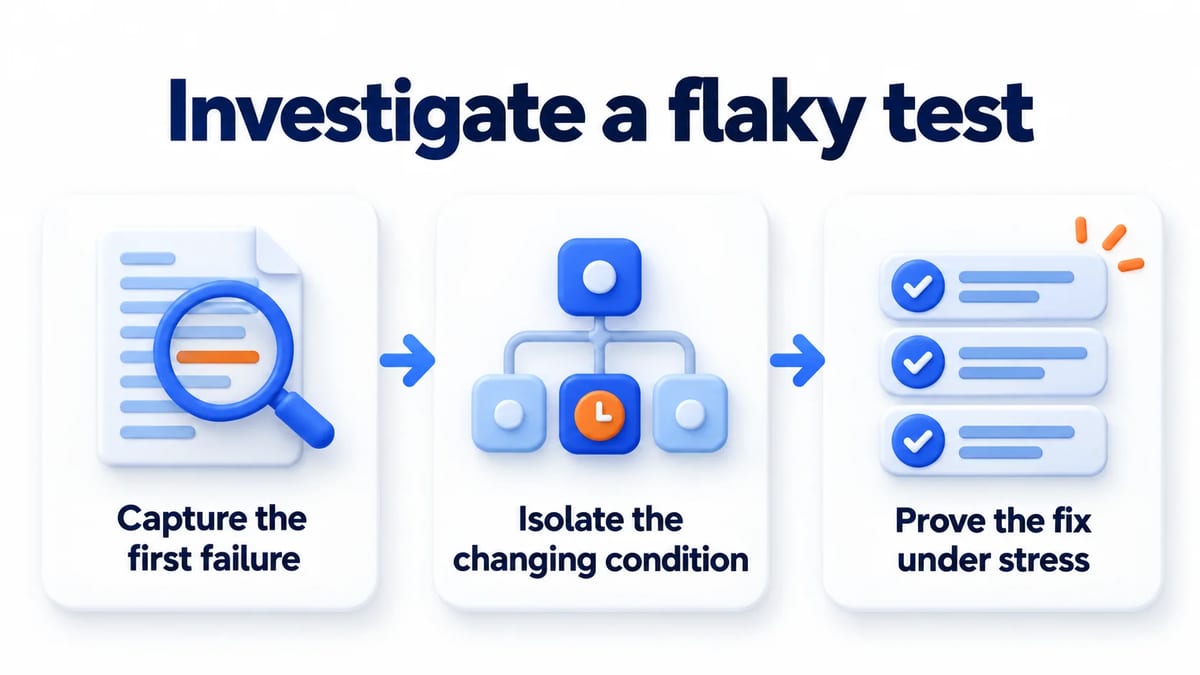
Reduce one failure to a controlled explanation
Capture the first failure
Save the assertion error, source revision, dependency lockfile identity, and exact runner command. Include browser and runtime versions, selected project, worker count, shard, retry index, and fixture identifiers. Record a random seed when one exists. Give each test run an identifier and keep application logs with request identifiers so the browser failure can be matched to server activity.
Use the Trace Viewer to inspect action timing, DOM snapshots, console output, and network activity around the failed step. Compare what the test requested with what the page displayed. A screenshot of the final error can miss the earlier request that returned the wrong account or never completed.
Choose trace retention deliberately. In a focused investigation, a configuration such as use: { trace: 'retain-on-failure' } preserves traces for failed attempts even when a later retry passes. The trace option reference documents that behavior. Recording only on-first-retry captures another execution, which may have different state. Limit expensive tracing to the scope you need and restrict access to artifacts containing account or request data.
Isolate the changing condition
Rerun the failing test using the recorded test environment before editing it. Select its reported line with npx playwright test tests/profile.spec.ts:42 --project=chromium --workers=1 --repeat-each=20 --retries=0. Replace illustrative line 42 with the actual reported line. First use --list without --repeat-each to verify that exactly one test is selected. The CLI reference documents these switches. Twenty repeats are an illustrative budget. Disabling retries here exposes each attempt; it is not a policy for every CI job.
Then remove the line selector to compare the isolated case with its full file, followed by the original suite. Preserve the sequence of tests when it fails only with a predecessor, then reduce the predecessor's setup. If concurrency matters, restore the original worker count while keeping other settings fixed. Write down the hypothesis, the single changed condition, and the observed result after each experiment.
A passing local run leaves the cause unresolved. Compare the CI image and service versions before increasing repetition. Changing selectors, timeouts, fixtures, and worker counts together can remove the symptom while making the explanation impossible to check.
Prove the fix under stress
Reapply the original trigger to the corrected behavior. For a delayed response, keep the response delayed. For shared records, overlap the affected tests. Also run the repaired case alone and with its neighboring suite so that cleanup and independence receive attention.
Where practical, demonstrate that the regression test fails against the previous implementation under the same controlled trigger. Then verify the corrected implementation and inspect its durable outcome. A successful profile update should preserve the expected stored values when the profile is read again, beyond the moment a confirmation message appears.
Record the completed execution count and conditions. Repeated passes provide evidence under those conditions, without proving that every possible interleaving is safe. Restore the normal execution policy and retain the regression that explains the defect.
Find the root cause of flaky tests
Use root cause analysis to connect the failure to a reproducible condition. Name the state or timing dependency, then explain how it changed the result. That explanation determines which part of the test automation or application needs repair.
Inspect test order and state between tests
The pytest flaky test guide identifies uncontrolled state, ordering assumptions, and overly strict assertions as causes worth investigating. Check module globals, session fixtures, temporary files, and background work that survives teardown. Even a unit test can leak a modified global into later test code. A test that passes only after another test may depend on missing setup. A test that fails afterward may inherit leaked state.
Give each test an owned namespace for accounts and records. Include execution and worker identity where concurrent jobs share a service. A constant email address remains shared even when each browser is fresh. Cleanup must remove only the resources that test owns, and must also run when an assertion fails.
Playwright's isolation model gives each test an independent browser context with its own browser storage. It does not allocate a separate database or queue. Trace the state boundary all the way to the backend. A database reset in one worker can delete another worker's fixture while both browsers remain isolated.
Preserve randomness and inspect resource contention
Capture the seed and random data together. A seed controls only the randomness routed through its generator. Independent calls to random functions, nondeterministic identifiers, and database ordering still need attention. Keep a concrete failing input after reducing it so a later generator change does not erase the regression.
When failure appears under parallel execution, compare worker counts as one controlled variable. Inspect memory pressure, connection pool waits, CPU saturation, and service throttling around the failed attempt. Reducing workers is a useful diagnostic. Decide whether the lasting correction belongs in test resource isolation, runner capacity, or application behavior under supported load.
Avoid treating every slow response as a reason to enlarge a timeout. Establish whether the operation eventually completes correctly and whether that delay is acceptable. A deadlock and a busy worker can produce the same timeout message while requiring different repairs. Record external dependencies that the code under test calls so an unavailable provider can be distinguished from a local scheduling problem.
Fix locator timing in browser automation
Distinguish an actionable element from a ready workflow
Playwright actionability checks wait for conditions such as visibility, stability, and enabled state before a click. Those checks do not establish that a server transaction has committed or that the application has finished restoring a session. Identify the readiness signal for the operation you are testing.
For a saved profile, prefer an observable saved state tied to that profile over an arbitrary sleep. Register an event or response wait before the triggering action when the event could arrive immediately. Await every asynchronous action and assertion. A missing await lets teardown or the next operation race work that the test still depends on.
The assertions documentation explains that locator assertions repeatedly inspect the element until the expectation succeeds or times out. For example, await expect(page.getByTestId('save-status')).toHaveText('Saved'); expresses a readiness condition. A one time read followed by a generic equality assertion can observe the earlier state and fail before the UI updates.
Keep assertions strong enough to catch the bug
Choose a locator that identifies the intended control. Playwright best practices recommend user facing attributes and explicit locator contracts over incidental DOM structure. Scope repeated controls to the relevant record. A selector that takes the first matching button can make a test pass while it edits the wrong item.
Waiting must preserve the requirement's deadline and outcome. If the interface announces success before persistence and customers can navigate away with unsaved changes, waiting longer in the test conceals a product defect. Correct the application's success signal and keep a regression for navigation at that boundary.
Control clocks and time zones at each boundary
Make date assumptions explicit
A date test can change outcome at midnight without any code change. Record the input timestamp, the interpreting time zone, and the expected calendar date. Test a daylight saving boundary deliberately when the feature supports affected zones. Avoid deriving expected and actual values from separate reads that can cross a boundary.
The Playwright clock guide distinguishes fixing the current date from controlling timers. Use page.clock.setFixedTime(new Date('2026-10-19T12:00:00Z')) for a stable browser date when timers should continue normally. Use the clock installation controls when the behavior depends on advancing scheduled work, following their required setup order.
Browser time control does not freeze the backend clock. Inject time into the service boundary when expiry logic runs there. Configure the browser's timezoneId when a test requires a particular zone, and configure the server separately. Compare instants for absolute deadlines and local dates for calendar rules according to the actual contract.
Set a CI retry policy while the repair is owned
Use retries with an explicit reporting policy
A bounded retry can help a team collect evidence while limiting disruption from a known intermittent problem. Keep the original error and every attempt visible. Decide which workflows may continue after recovery and which require every initial attempt to pass, based on the behavior's release risk.
Playwright replaces a failed worker and its browser before retrying, and setup hooks can run again. A retry therefore changes more than elapsed time. If it passes, compare the repeated setup and external state before concluding that the first error was harmless.
The current CLI supports --fail-on-flaky-tests, which fails a run when any test receives the flaky classification. Verify support in the installed version before enabling it. This can preserve diagnostic retries while enforcing a stricter release policy for a selected suite. It does not diagnose why a test recovered.
Give quarantine an owner and an expiry
Quarantine removes a test's authority to block a chosen workflow, so document the coverage gap. Attach the failing signature, affected requirement, evidence, named owner, and expiry date to a repair issue. State the return criteria in terms of the original trigger and the normal suite configuration.
Continue executing quarantined tests in a visible job. Escalate expired entries to the owner and review new failure signatures separately. A known timeout should not automatically excuse a new assertion about corrupted data. Keep critical coverage elsewhere when removing a check from release enforcement would leave an unacceptable gap.
Prioritize repairs by customer consequence, lost coverage, frequency, and investigation cost. To fix flaky tests durably, include the original trigger and verification evidence in the repair pull request. Retire an obsolete test only after confirming that the requirement disappeared or that another check covers it. Deletion should leave a reviewable reason in the team's testing process.
Connect the regression to customer feedback
Use the Playwright end to end testing guide for broader browser suite design. When the failure crosses a service boundary, the contract testing guide helps separate interface expectations from execution timing. Keep this investigation centered on the changing condition behind the intermittent result.
Create a BetaRoast feedback round on a safe build when people need to assess the visible recovery experience. Ask whether a pending save or a retry message explains what happened. BetaRoast collects human feedback; it does not diagnose CI flakes or verify concurrency correctness. Convert a useful observation into a reproducible requirement before adding its automated regression.
Frequently asked questions
Does a passing retry mean the failure was harmless?
No. A different schedule or fresh worker can avoid a real product race. Preserve the first attempt and compare its outcome with the product contract. The retry establishes that another execution passed, without explaining the original failure.
Should all flaky tests have retries disabled?
Choose retries by workflow and reporting needs. Disabling them during a focused reproduction exposes each attempt clearly. A CI policy can permit bounded diagnostic retries while still reporting initial failures or rejecting flaky outcomes for selected release checks.
How many passing runs prove a flaky test is fixed?
There is no universal count. Choose a budget based on the suspected trigger and execution cost, then report what ran. A controlled regression that recreates the old failure explains more than repeated passes under conditions that never exercised it.
When is quarantine appropriate?
Use it when the team accepts a documented temporary coverage gap and assigns a repair owner. Keep the test running visibly, set an expiry, and specify how it returns to enforcement. Treat failures involving customer data or critical operations according to their release risk.
Preserve the first failure, identify which execution condition changed, and reproduce it before choosing a fix. Verify the original trigger and surrounding suite behavior. Keep retry outcomes visible and give every quarantine an owner, expiry, and explicit return criteria.