
Should your next TestFlight build go to internal testers, external testers, or both?
iOS app beta testing is the controlled step between a build that passes your team’s checks and an app that is ready for real users. TestFlight gives developers a familiar distribution path, but the tool does not design the experiment for you. You still need the right testers, a clear mission, device coverage, and a triage process that turns feedback into release decisions.
This guide explains how to set up a practical TestFlight beta, choose internal or external testers, recruit people who match your audience, and collect evidence that an iOS developer can act on.
What is iOS app beta testing?
iOS app beta testing is pre release testing with people outside the core implementation loop. Testers use a build on a real iPhone, iPad, or other supported Apple device and report problems that may not appear in simulator runs or internal QA.
The purpose is not simply to prove that the app launches. A strong beta answers questions such as
- Can a new user understand the first screen without coaching?
- Does the primary task work on the devices and iOS versions you support?
- What happens when a permission is denied, a connection drops, or the app resumes from the background?
- Are copy, navigation, accessibility, and loading states understandable?
- Do external users interpret the feature the way the team intended?
TestFlight is a distribution and feedback channel. It does not replace unit tests, UI automation, security review, accessibility testing, crash monitoring, or App Store review.
TestFlight internal versus external testers
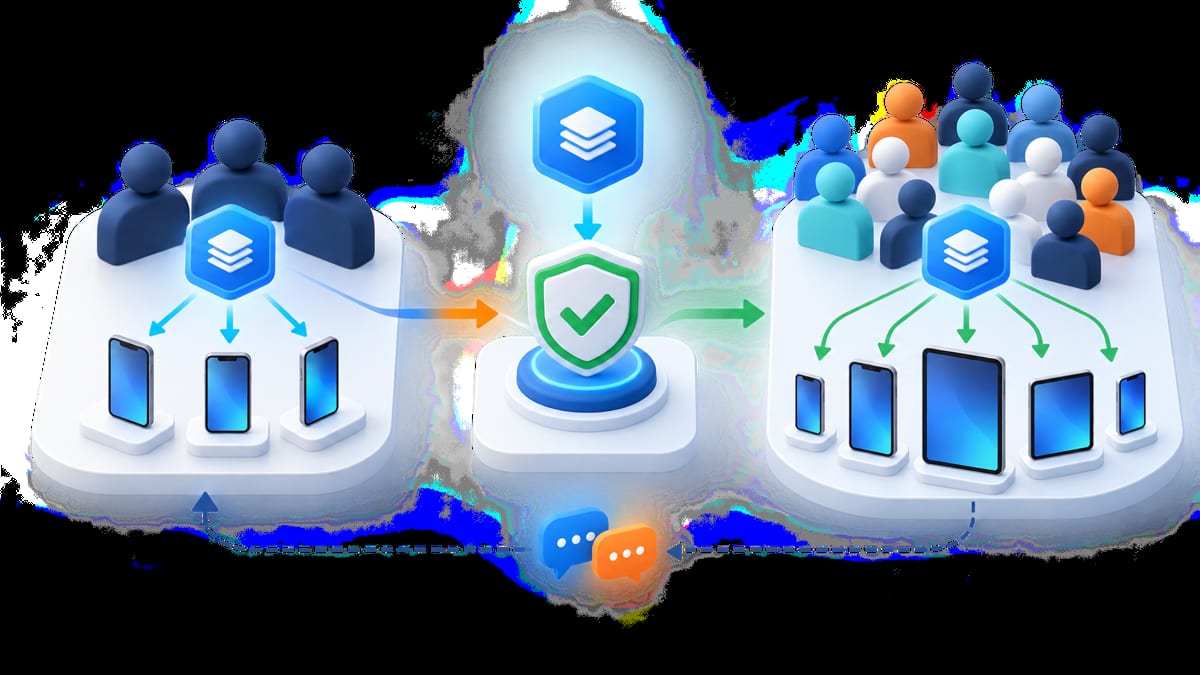
App Store Connect separates people who already have access to your team from testers outside the team
- Internal testers are App Store Connect users on your development team. They are useful for fast smoke tests, build verification, and daily iteration.
- External testers are people outside your App Store Connect team. They are better for product discovery, usability, real world workflows, and testing with the audience you do not see during development.
Apple currently documents up to 100 internal testers and up to 10,000 external testers, subject to its current program rules. Most teams should start with a smaller, intentional group. The limiting factor is usually feedback quality and triage capacity, not the maximum invitation count.
Read Apple’s TestFlight overview and the current App Store Connect workflow before you plan a release. External testing has a review step for the first build you submit to TestFlight external testing, so schedule time for that review.
Prepare App Store Connect before inviting testers
Create the app record, upload a build, and make the beta understandable before recruitment. Your tester should not need to ask which build to install or what “done” means.
Prepare
- A unique build number and a release name that the team can identify.
- A short “what to test” note in TestFlight.
- A tester mission with a start state, success criteria, and edge case.
- Test accounts or a safe sign up path that does not expose production customer data.
- A support channel for urgent issues and a deadline in a stated timezone.
- Crash and analytics instrumentation that distinguishes beta activity from production.
- A privacy explanation for any data captured during testing.
- A device and iOS version matrix based on your real audience.
Keep the build stable enough for feedback. If login, onboarding, or the core action is broken, fix that in an internal testing pass before you ask external testers to evaluate the rest of the product.
Invite testers with the right method
TestFlight supports email invitations and public links. Use email when you know exactly who should join or when the round contains private product information. Use a public link when you need a larger pool and the app is appropriate for broader recruitment.
The invitation should tell testers
- Which device and iOS version you need.
- How long the task should take.
- What to do before starting.
- Which parts of the app are in scope.
- How to submit feedback, screenshots, or a crash report.
- Whether there is a reward and what completion means.
- What data they should not enter into the beta.
Apple’s tester information can include device, OS, sessions, crashes, and feedback. A tester who joins through a public link may appear anonymously, so collect only the profile information your research actually needs. See Apple’s TestFlight tester information reference when deciding what to ask for separately.
Recruit iOS testers who match the product
Do not recruit only the people who are easiest to reach. Recruit for the decisions you need to make.
Useful screening fields include
- iPhone or iPad model and iOS or iPadOS version.
- Country, language, region, and timezone.
- New user, returning user, or experienced customer.
- Relevant hardware, such as camera, GPS, Bluetooth, keyboard, or Apple Watch.
- Network conditions and whether the user regularly switches between Wi Fi and cellular.
- Accessibility settings that matter to the product.
- Availability during the testing window.
BetaRoast can support this matching step by letting you create an iOS testing round, describe the mission, and recruit testers who fit the device and user profile. A focused round with ten relevant testers can be more useful than a large list of people who all own the same device and behave like the development team.
If the same product ships on Android and iOS, keep the research question shared but create platform specific tasks. The navigation, permissions, system UI, and failure modes are not identical.
Design missions for actionable beta feedback
Give testers a scenario, not a feature tour. For example
You have just received a confirmation email. Open the app, find the order, change the delivery preference, and return to the confirmation screen. Then repeat the flow with the network temporarily unavailable.
Ask the tester to note
- What they expected to happen.
- What they did.
- What happened.
- Whether they could recover without help.
- The device, OS, build, and network state.
- A screenshot or recording when it explains the issue.
A good bug report has a concise title, numbered reproduction steps, expected behavior, actual behavior, frequency, and impact. Ask for screenshots only when they are safe to share, and tell testers to redact names, addresses, payment details, or private messages.
For usability findings, capture the moment of confusion rather than forcing every comment into a bug category. “I did not know this row was tappable” is a product signal even when the code behaves correctly.
Cover the iOS test matrix
Choose the matrix from your audience and the APIs you use
- Supported iOS and iPadOS versions.
- Small and large screens, including supported orientation changes.
- Older and newer devices.
- Fresh install, upgrade, sign in, sign out, and returning user states.
- Permission states for notifications, location, camera, microphone, photos, contacts, and tracking where relevant.
- Offline, slow, and interrupted connections.
- Locale, time zone, keyboard, dynamic type, dark mode, and accessibility settings.
- Background and foreground transitions, notifications, deep links, and interrupted tasks.
Do not ask every tester to cover every case. Assign each person a small matrix slice and keep a coverage sheet so the team can see which risks are still untested.
Review feedback and ship deliberately
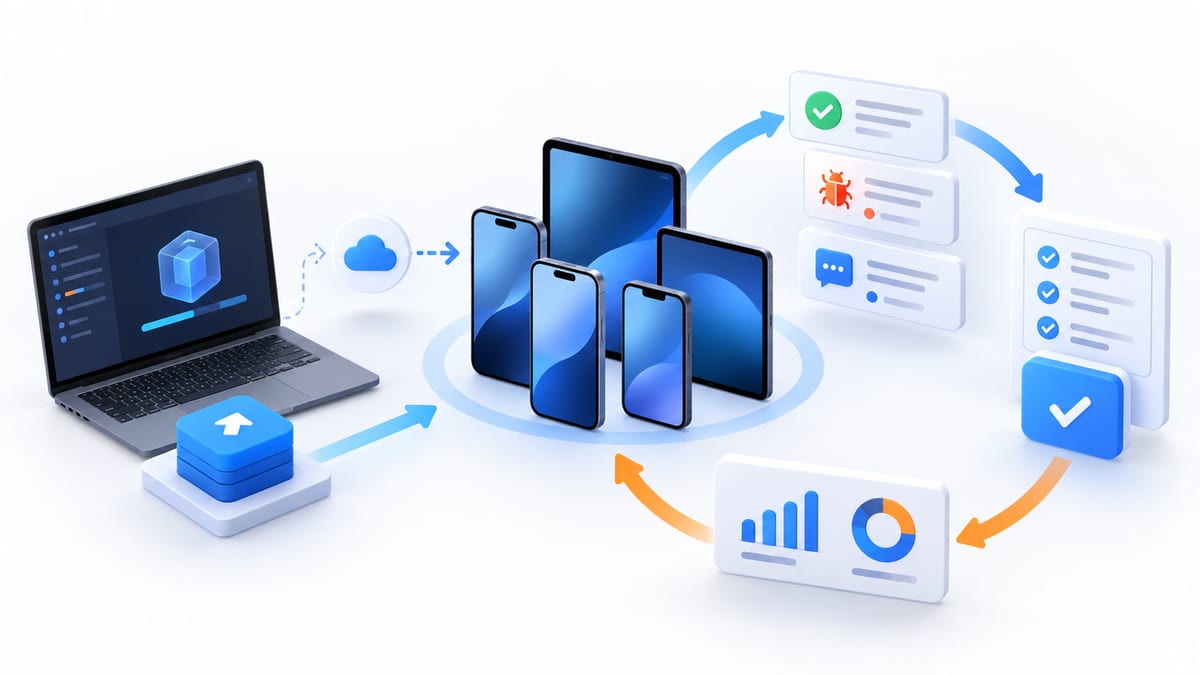
During a TestFlight round, review feedback on a predictable cadence. Group duplicate reports, reproduce the highest impact issue first, and label each finding as accepted, needs information, fixed for retest, or deferred.
A practical triage order is
- Crashes, data loss, sign in failures, and blockers in the core journey.
- Issues that affect a supported device or OS segment.
- Problems that create incorrect data, unclear consent, or unsafe recovery.
- Usability friction and visual defects.
- Suggestions that belong in the roadmap rather than the release.
When a new build fixes an issue, tell testers what changed and what to retest. Keep release notes short enough that the tester can act on them. A beta is a conversation; silent fixes waste the context your testers already provided.
TestFlight feedback is also useful after the first round. Apple provides developer access to beta feedback and crash information, so use the data to compare reported issues with actual failure patterns. Do not assume that a quiet feedback inbox means the build is healthy; low engagement can mean the mission or onboarding is unclear.
Keep beta and production data separate
Create a deliberate boundary between the beta environment and real customer data. Use test accounts, synthetic records, safe payment flows, and reset instructions where possible. If your app uses subscriptions, purchases, or other sensitive integrations, document the sandbox behavior and never ask an external tester to use a real financial credential unless the risk has been explicitly reviewed.
Explain what data the beta collects, who can see the feedback, and how a tester can stop participating. Build expiry and TestFlight availability change over time, so link to Apple’s current documentation instead of promising a fixed lifetime in evergreen copy.
iOS app beta testing checklist
- Create the app record and upload an identifiable build in App Store Connect.
- Decide whether the round needs internal testers, external testers, or both.
- Confirm whether the first external build needs TestFlight review.
- Define supported devices, OS versions, locales, and permission states.
- Prepare a tester mission, safe test data, support channel, and deadline.
- Recruit people who match the real audience and device matrix.
- Explain how to install the TestFlight build and submit feedback.
- Ask for device, build, reproduction steps, expected result, actual result, and evidence.
- Triage crashes and core journey blockers before polish issues.
- Send fixes back to testers for retest and keep beta data separate from production.
Frequently asked questions
How can I beta test apps on iOS?
For an app you develop, upload a build to App Store Connect and distribute it through TestFlight to internal or external testers. For an app you are testing, accept the invitation or public link, install TestFlight, and follow the developer’s mission and feedback instructions.
What is TestFlight used for?
TestFlight is Apple’s beta distribution and feedback service. Developers use it to invite testers, distribute pre release builds, and collect feedback before publishing an app. It is not a substitute for engineering QA or App Store review.
How do developers invite testers to TestFlight?
They can add App Store Connect users as internal testers, invite external testers by email, or share a public link when the testing setup allows it. The developer should include the required device, task, deadline, feedback channel, and privacy guidance.
Do Apple beta testers get paid?
Not automatically. Some teams offer rewards, some recruit existing customers, and some run volunteer or community testing. Confirm the reward, eligibility, and completion criteria before joining a round.
Is it safe to beta test an iOS app?
Treat beta software as less stable than a public release. Use test data, avoid entering secrets or payment details, review the developer’s privacy information, and report security problems through the private channel they provide.
How many iOS beta testers do I need?
Start with enough people to cover the highest risk devices, OS versions, and user contexts. Add testers when you need more coverage or when the feedback volume is too low to make a release decision. A small, well matched group beats a large group that never completes the mission.
Ready to run an iOS beta?
Create a BetaRoast testing round with your TestFlight link, device requirements, and task brief. Recruiting the right testers early gives your team time to fix real world issues before App Store launch.
Successful iOS app beta testing starts with a release question, not an invitation count. Use internal testers to verify installation, sign in, core flows, and build stability before widening access. Bring in external testers when you need realistic product behavior, broader device coverage, accessibility feedback, and users who do not share the development team’s assumptions. Every TestFlight round should define the audience, supported devices, test mission, evidence format, deadline, and privacy boundaries before the first invitation is sent. Review crashes and blockers in the core journey first, group duplicate findings, and return fixed issues to the original tester whenever possible. Keep beta accounts and data separate from production, and confirm current App Store Connect requirements before each launch because platform workflows change. With that structure, TestFlight becomes more than a distribution tool. It becomes a repeatable decision system. BetaRoast can help recruit relevant testers and organize the mission so your next iOS release is supported by evidence instead of guesswork.