
A permission prompt is one transition. Reliable iOS features also survive partial access, denial, and permissions changed in Settings.
iOS app permission testing verifies the contract between a person's access decision and the feature they want to use. A successful test proves that the app requests only necessary access, reacts to the actual authorization state, and preserves a useful path when access changes.
This guide uses a fictional FieldNote app with photo attachments, voice notes, nearby places, and reminders. Every example is a proposed test, not a claim of executed results. Use the iOS beta testing guide to plan distribution and device coverage around these missions.
Follow a repeatable iOS permission testing workflow
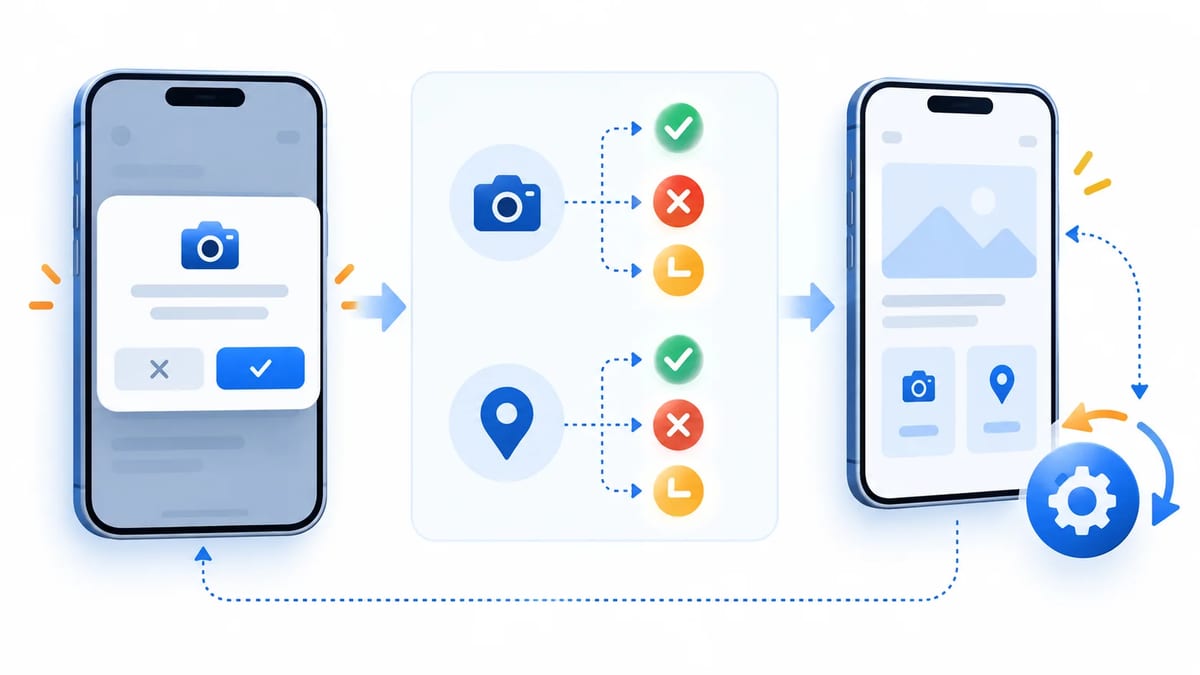
Define the expected behavior before opening the system prompt. Give every case an observed starting state and a visible outcome.
- Record build, bundle identifier, device, exact OS version, and installation history.
- Query the permission through its native API before triggering the feature.
- Perform one contextual action and record the requested access level.
- Choose an available system option and verify the feature or fallback.
- Change access in Settings, return or relaunch, and verify refreshed behavior.
Separate prompt appearance, authorization result, hardware availability, and task completion. An authorized camera can still fail to start a capture session. A selected photo can still fail to load. These failures need different diagnoses.
Build a permission state matrix
Define four baseline state contracts
Use these conceptual rows wherever the framework exposes them. Apple's AVAuthorizationStatus reference defines the camera capture states.
notDeterminedmeans no decision yet. A deliberate feature action may request access, with one request in flight.deniedmeans access was declined. Preserve the draft, provide a fallback, and offer Settings when appropriate.restrictedmeans access cannot currently be granted by the person. Explain availability without promising that an app permission toggle can fix it.authorizedmeans access is permitted. Continue the feature and handle operational errors separately.
Do not manufacture an identical enum for every framework. Audio recording exposes undetermined, denied, and granted. Core Location distinguishes When in Use and Always. Photos adds limited access, while notifications adds provisional authorization. Retain the native value alongside your feature decision so diagnostics remain meaningful.
Add partial access and transition rows
Extend the matrix with limited Photos access, reduced location accuracy, temporary location authorization, and provisional notifications. Each row needs a required capability, expected interface, fallback, and refresh trigger. Unknown future enum cases should produce a recoverable interface rather than optimistic access.
Include transitions from allowed to denied, limited to full access, and temporary access to an expired state. A single launch with everything enabled covers very little of this contract.
Apple explains that restricted capture access can result from system restrictions such as parental controls. Test that branch with a controlled configuration when available. An injected state can verify interface logic, but label it as simulated and retain separate device coverage.
Test contextual camera and microphone requests
Request access at the feature boundary
For a photo attachment, read AVCaptureDevice.authorizationStatus(for: .video) and request AVCaptureDevice.requestAccess(for: .video) when the person chooses Take Photo. Apple's capture authorization guide describes the required checks and purpose strings.
Camera permission does not grant microphone permission. A still-photo flow should not request recording access simply because the app also supports voice notes. For a video feature that needs audio, define what happens if camera access succeeds and microphone access fails. Offer silent capture only if the product supports it and describes the result clearly.
Use the current recording permission API
On iOS 17 and later, check AVAudioApplication.shared.recordPermission and use AVAudioApplication.requestRecordPermission() for voice recording. Apple's recording request reference documents the asynchronous response and remembered decision. Keep any older deployment-target implementation behind availability checks.
Test denial without saving a misleading silent recording as success. After authorization, verify recording start, interruption handling, cancellation, and playback of synthetic audio. Permission approval alone does not validate the audio session or input route.
Review purpose strings in the distributed target
Inspect the built target's NSCameraUsageDescription and NSMicrophoneUsageDescription, including localized values. Explain the concrete task, such as attaching a photo to a note. Missing required descriptions can terminate the app when protected APIs are used. Validate the artifact rather than relying only on an editor setting.
A neutral explanation screen may clarify the task, but it should preserve an equally understandable way to continue without access. Avoid rewards, threatening copy, or repeated pressure after denial. Purpose strings explain access; their presence does not establish legal compliance.
Distinguish Photos selection from library authorization
Import through PHPicker without a blanket request
If FieldNote only needs an attachment selected by the person, use PHPickerViewController and load its returned item providers. Apple's Photos selection sample explains that this picker does not require photo-library permission. Presenting it does not grant general PhotoKit access.
Test selection, cancellation, repeated selection, and an asynchronous load failure. With PhotoKit access denied, the picker import should still follow its own contract. Do not reject selected media merely because an unrelated library authorization check reports denied.
Treat limited PhotoKit access as a supported outcome
A custom library browser needs a different matrix. Query PHPhotoLibrary.authorizationStatus(for: .readWrite) and handle .limited alongside the other Photos authorization states. Limited access permits the authorized subset, not the entire library.
For a proposed sequence, select two synthetic images, open the custom browser, add another selection through the limited-library management interface, then remove one through Settings. Refresh available assets and handle a previously stored identifier becoming inaccessible. Do not treat a smaller result set as proof that an asset was deleted globally.
Apple documents limited-library management through presentLimitedLibraryPicker. Test cancellation without expanding access. If the app controls its own management entry point, evaluate PHPhotoLibraryPreventAutomaticLimitedAccessAlert deliberately to avoid competing selection prompts.
Separate adding photos from reading them
For export alone, evaluate .addOnly rather than requesting read/write access. Use the appropriate NSPhotoLibraryAddUsageDescription; Apple's add-only purpose key explains that scope. A feature using general library access needs NSPhotoLibraryUsageDescription. Test import and export independently, because success in one does not authorize the other.
Test location authorization and accuracy independently
Start with When in Use and a manual fallback
For nearby places, query CLLocationManager.authorizationStatus and request requestWhenInUseAuthorization() in context. Provide NSLocationWhenInUseUsageDescription. Follow Apple's location authorization guidance and observe locationManagerDidChangeAuthorization(_:).
When access is denied or restricted, let the person enter an area manually. Test device-wide Location Services availability separately from the app's authorization. Request Always only for a feature that actually needs it, with its separate purpose description and background behavior coverage.
Cover Allow Once and reduced accuracy
Allow Once provides temporary When in Use authorization, not a separate persistent enum case. An observed .authorizedWhenInUse cannot establish that the person granted durable access. Test the task, background departure, and later return or relaunch, then query again instead of predicting a fixed expiration time. Apple's location authorization session discusses this temporary-access recovery.
Check accuracyAuthorization independently. A person may permit location while granting reduced accuracy. Apple's accuracy reference explains why increasing desiredAccuracy does not override that choice. Nearby-area suggestions should remain useful; a precision-dependent feature needs a clearly scoped request or fallback.
If the app adopts iOS 18 and later CLServiceSession APIs, add coverage for session ownership and implicit authorization requests. Starting an async location sequence can itself express an authorization goal. Verify that a background component does not unexpectedly request location before the relevant feature is engaged.
Verify notification authorization separately from APNs
Read current interaction settings
Use UNUserNotificationCenter to request relevant options when a reminder becomes useful. Read notificationSettings() afterward and on return to the app. Apple's notification permission guide distinguishes explicit permission from provisional authorization.
Provisional notifications are noninterruptive trial notifications. They should not be tested against an expectation of an ordinary banner and sound. Even an .authorized result does not mean every interaction is enabled. Inspect alert, sound, and badge settings, and record Focus or scheduled delivery when investigating appearance.
Keep transport evidence outside the permission result
registerForRemoteNotifications() starts APNs registration. Its token callback and failure callback concern registration, while User Notifications authorization concerns user-facing interactions. Apple's APNs registration reference documents the distinction.
Use a synthetic local reminder to isolate authorization and presentation first. Follow with a separate remote-delivery case if the product uses APNs. A token or accepted server request cannot prove that the person saw an alert. This guide's release contract concerns iOS access decisions; provider credentials and messaging delivery need their own investigation.
Exercise Settings recovery and asynchronous lifecycle changes
Refresh access when the app becomes active
For ordinary denied camera, recording, PhotoKit, and notification requests, repeating the same request does not recreate the first system prompt. Offer an optional Settings action using Apple's app Settings URL, UIApplication.openSettingsURLString, then requery relevant states when the scene becomes active. Opening Settings is not evidence that permission changed.
Propose both directions. Deny recording, enable it in Settings, return, and intentionally start a recording. Then revoke it while a draft exists and return or relaunch. Preserve the draft, update controls, and stop unauthorized work. Also test returning without changing anything. Avoid automatic capture as a side effect of recovery.
Prevent overlapping requests and stale completions
Centralize request coordination so repeated taps and multiple views cannot begin the same request twice. Sequence different permission stages according to the active task. Refresh callbacks should update state without immediately starting another prompt.
Test navigating away while awaiting a response, backgrounding during a staged flow, and canceling after the first permission succeeds. Apply interface updates on the main actor and verify that the requesting feature still exists before resuming it. A late completion must not resurrect a dismissed recorder or present another permission screen over a different task.
Make repeatable checks useful release evidence
Scope simulator resets and record OS coverage
Apple's Xcode simulator privacy notes document reset support. Inspect xcrun simctl help privacy for the installed Xcode version. On an explicitly chosen simulator, a proposed scoped reset is xcrun simctl privacy <SIMULATOR_UDID> reset all com.example.fieldnote. Replace placeholders with your own simulator and app identity, and retain the bundle identifier.
Read authorization afterward to establish the starting state. Supported services vary; this command is not a universal notification or hardware reset. Grants injected through simulator tooling can mask missing purpose strings and do not prove the real request path works.
Cover the minimum supported OS, the current supported release, and versions where your implementation changes. Include iOS 14 or later limited Photos and reduced accuracy where relevant, the iOS 17 recording API boundary, and any iOS 18 location-session path. Keep beta OS findings separate from stable-release evidence.
Automate state logic and native prompts separately
Inject native authorization states into unit tests of feature policy. Assert permitted actions, preserved drafts, and fallback controls across requests, denials, and revocations. These tests check how app permissions affect behavior without claiming to exercise iOS authorization.
Use XCTest UI tests with XCUITest APIs for a separate native-prompt journey. Reset supported permissions only for the intended app on the chosen simulator, launch it, trigger the feature, verify prompt content, and select the case's allow or deny option. Match expectations to the tested OS and localization rather than accepting every alert.
Apple's UI interruption guidance says expected modal UI belongs in the test flow. Use an interruption monitor only for an unrelated blocking interruption, verify its identity, and leave unrecognized UI unhandled. Preserve explicit denied cases and manual physical-device checks after automation passes.
Collect evidence without collecting private content
Do not assume installation or reinstallation guarantees clean permissions. Record installation history and query actual states. Repeat critical journeys on physical devices using the distributed build, especially capture, temporary location, restrictions, and revocation. Simulator results support deterministic checks but do not establish physical-device behavior.
Reports should contain case ID, build, OS, native state before and after, action, expected outcome, actual outcome, and whether the evidence came from simulation or hardware. Use synthetic photos, audio, locations, and reminder text. Redact private content and tokens from recordings and logs. Follow the mobile bug report guide and assign specific state transitions in a BetaRoast testing round.
Frequently asked questions
Should every permission appear during onboarding?
Request access when the person engages the feature that needs it. A first launch should not consume unrelated permission decisions. Test that declining one optional feature leaves the rest usable.
Can the app show the system prompt again after denial?
Ordinary repeated requests for these denied permissions do not reset the decision. Offer optional Settings recovery and refresh on return. Temporary location access and distinct authorization upgrades require their own state-specific tests.
Does limited Photos access prevent PHPicker imports?
No. PHPicker selection and general PhotoKit access are separate contracts. Verify item-provider loading independently and restrict any subsequent PhotoKit fetches to the access actually granted.
Is reinstalling enough to establish a fresh test?
No. Treat freshness as an observed authorization state. Use scoped simulator resets for supported services and document physical-device preparation separately. Installation history alone cannot establish a clean permission matrix.
Define each feature's permission contract, record the native authorization state, and verify the useful outcome after every transition. Cover partial Photos access, temporary and reduced-accuracy location, notification settings, concurrent requests, and Settings revocation. Use scoped simulator resets for repeatable checks, then collect separate evidence from the distributed build on supported physical devices.