
A beta is the final controlled system for discovering what real users, real devices, and real conditions will break before launch.
Mobile app beta testing puts a near release build in the hands of real users before a public launch. It reveals the failures that are difficult to reproduce inside a development team. Different devices, interrupted networks, unfamiliar navigation, unexpected permission choices, and real user goals all change how an app behaves.
A professional beta is not a loose request to try the app. It is a controlled release experiment with a defined audience, measurable tasks, useful instrumentation, and an exit decision. This guide shows how to build that system for Android and iOS.
What is mobile app beta testing?
Mobile app beta testing is a pre release phase in which selected users test a functional version of an app in realistic conditions. The build should already pass automated checks, engineering review, and internal quality assurance. Beta testers then expose gaps between technical correctness and actual usability.
Alpha testing usually stays close to the product team and focuses on fundamental stability. Beta testing expands to people who represent the target market. A closed beta limits access to an invited group. An open beta accepts a wider audience when the product is mature enough for broader exposure.
The aim is evidence. A useful beta should tell the team whether people can complete the core journey, which environments fail, which problems block release, and whether a fixed build actually resolves those problems.
Set release criteria before recruitment
Write the release decision before inviting a single tester. This prevents the team from changing the standard after seeing uncomfortable results.
A practical release gate can include the following conditions.
- The core journey completes successfully on every supported platform segment.
- No open defect causes a crash, data loss, unsafe behavior, or blocked sign in.
- Performance stays within the limits defined for startup, loading, and key interactions.
- Accessibility and permission flows work for the settings your audience uses.
- Every high risk issue has been retested on the device and state that exposed it.
- The team understands any accepted limitation and has documented the recovery path.
Avoid using tester count as the main quality signal. Fifty installs with no completed mission are less useful than twelve well matched testers who cover the riskiest environments and submit reproducible findings.
Build a mobile app beta testing process
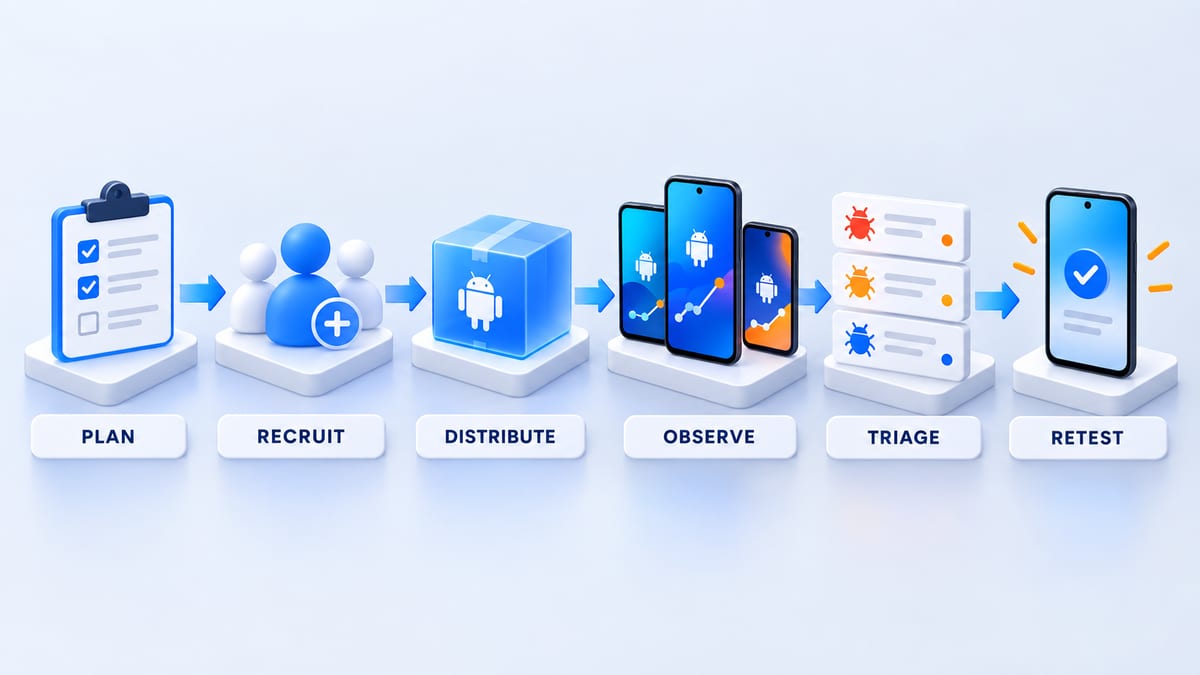
Use one repeatable loop for every beta build.
Plan the release question
Name the decision the round must support. You might need to verify onboarding, payment recovery, background synchronization, camera behavior, or a redesigned navigation flow. Keep each round narrow enough that testers understand what deserves attention.
Recruit for coverage
Define the user context and technical environment you need. Screen for platform, device, operating system, locale, network conditions, experience level, and availability. The companion guide on how to find beta testers explains how to build that audience.
Distribute the right build
Give every build a unique version and release note. Include installation instructions, test accounts, reset steps, the mission, the feedback channel, and the deadline. A tester should be able to begin without scheduling a call.
Observe behavior and evidence
Combine analytics, crash reporting, performance monitoring, and direct feedback. Instrument the core funnel before distribution so you can distinguish a healthy session from a tester who installed the app and became stuck.
Triage by user impact
Group duplicate reports and prioritize crashes, data loss, privacy risks, failed sign in, and blocked core tasks. Record the environment and build for every accepted issue. Product ideas belong in a separate queue so they do not hide release defects.
Retest before closing
Return a fixed issue to the original tester or reproduce the original environment as closely as possible. A code review and a green automated test are useful, but they do not prove that the real world failure is gone.
Choose Android and iOS distribution
Google Play offers internal, closed, and open testing tracks. Internal testing is useful for a small trusted group. Closed testing gives the team control over a selected audience. Open testing is appropriate only when the app and listing are ready for broader visibility. Our Android app beta testing guide covers the track decision and Play Console workflow in detail.
Google currently requires certain newer personal developer accounts to complete a closed test with at least 12 testers continuously opted in for 14 days before applying for production access. Confirm the rule for your own account in the official Google Play requirements because platform policies can change.
Apple TestFlight separates internal and external testing. Apple currently documents support for up to 100 internal testers and 10,000 external testers. Builds can remain testable for up to 90 days. External testing supports email invitations and public links, while the first external build may require Beta App Review. Read the full iOS TestFlight beta testing guide and verify details in the official TestFlight overview.
Firebase App Distribution can be useful for trusted cross platform QA groups, pre store builds, command line distribution, and continuous integration. It does not replace the platform release requirements that apply when you move to production.
Define a cross platform test matrix
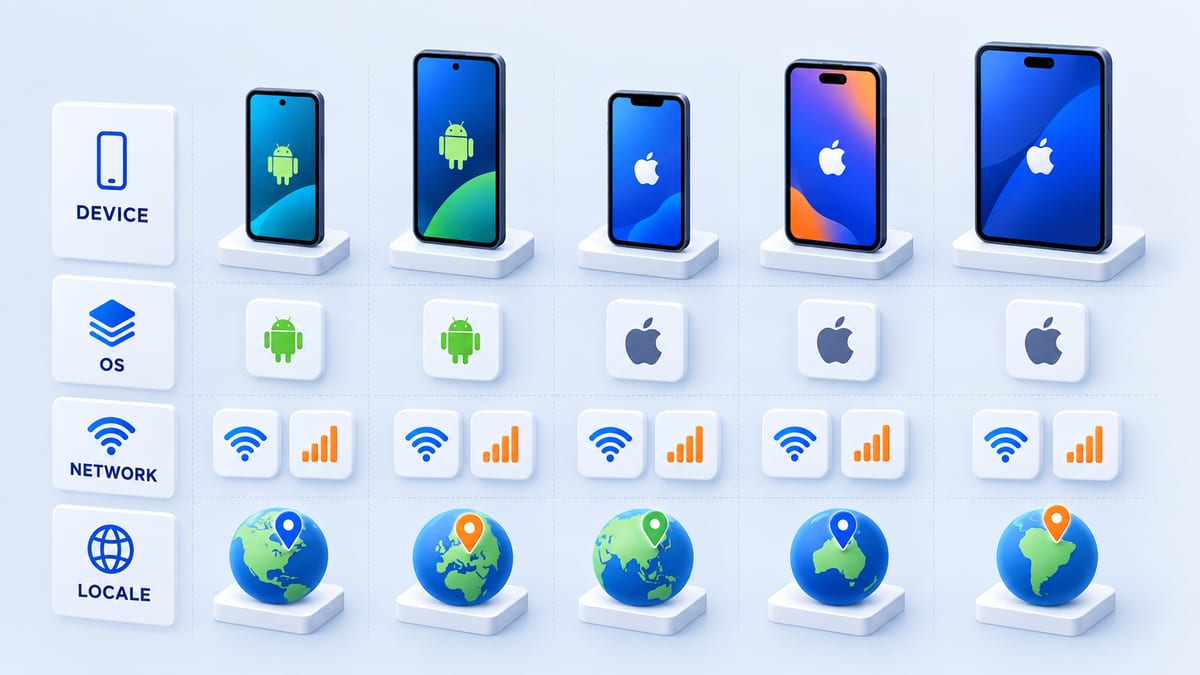
Start with production analytics, support history, market research, and the APIs your app uses. Then select combinations that represent business risk.
- Cover the supported Android and iOS versions that hold meaningful audience share.
- Include small and large screens plus low, mid, and high performance devices.
- Test fresh installs, upgrades, returning sessions, expired sessions, and restored accounts.
- Exercise denied and limited permissions for camera, photos, location, microphone, and notifications when relevant.
- Move between Wi Fi, cellular, slow connections, offline states, and interrupted uploads.
- Include target languages, long translations, right to left layouts when supported, time zones, currencies, and date formats.
- Cover accessibility settings such as larger text, screen readers, reduced motion, and increased contrast.
Assign each tester a deliberate matrix slice. Asking everyone to explore freely often creates repeated coverage of the happy path and no coverage of the edge cases that matter.
Write missions that create actionable feedback
A good mission describes a realistic goal and a starting state. It does not tell the tester where every button is because that hides discoverability problems.
For example, ask a tester to create an account, find a specific item, save it, interrupt the connection, reopen the app, and confirm that the saved state recovers. State which parts are intentionally incomplete so testers do not waste time reporting known limitations.
Every defect report should include the build, device, operating system, account state, network state, reproduction steps, expected result, actual result, frequency, impact, and safe visual evidence when available. Ask for the moment of confusion as well as technical failures. A user who cannot identify the next action has found a product problem even when the code works as written.
Measure beta participation and quality
Track the full participation funnel.
- Invitations delivered
- Testers who joined
- Builds installed
- Missions started
- Missions completed
- Actionable reports submitted
- Accepted issues retested
Pair these numbers with crash free sessions, completion rate for the core journey, time on task, recovery rate, and defect severity. Low feedback volume can mean a healthy build, but it can also mean the installation or mission was unclear. The funnel shows where participation stopped.
Triage findings and decide when to launch
Review new findings on a predictable cadence. Give each accepted issue an owner, severity, build, environment, and retest status. Close duplicates without losing their device evidence because repeated reports can reveal the size of the affected segment.
Do not average away a severe failure. A payment crash on one supported device may matter more than twenty positive comments from newer phones. Release when the predefined gates are met and the remaining limitations are understood, recoverable, and acceptable to the product owner.
Mobile app beta testing checklist
- Define the release question and exit criteria.
- Instrument the core journey and crash reporting.
- Build a cross platform coverage matrix.
- Recruit testers who match the audience and environments.
- Prepare a versioned build with safe test data.
- Write one clear mission and feedback format.
- Track activation and completion rather than invitations alone.
- Triage by user impact and preserve environment evidence.
- Retest blockers in the original conditions.
- Record the launch decision and accepted risks.
Frequently asked questions
How long should mobile app beta testing run?
Run long enough for the selected testers to complete the mission and for the team to triage and retest important fixes. A focused feature round may take several days. A release candidate with broad device coverage may need multiple rounds. Platform account requirements can also set a minimum duration.
How many beta testers does a mobile app need?
There is no universal number. Start with enough testers to cover the important user, device, operating system, network, and locale combinations. Add people when a risk remains uncovered or participation is too low to support the release decision.
What is the difference between alpha and beta testing?
Alpha testing stays closer to the product team and validates basic function and stability. Beta testing uses a more realistic audience and environment to evaluate complete journeys, usability, compatibility, and release confidence.
Should beta testers be paid?
Payment is useful when the task requires specific expertise, sustained participation, difficult recruitment, or a detailed research session. Volunteer rounds can work for enthusiastic communities and early access programs. State the reward and completion conditions before people join.
Can TestFlight test Android apps?
No. TestFlight distributes Apple platform builds. Android beta programs usually use Google Play testing tracks or another Android distribution service.
Run your next beta with evidence
Create a BetaRoast testing round with the audience, device requirements, mission, and deadline written clearly. A structured round gives your team the evidence to fix the right problems and launch with confidence.
Professional mobile app beta testing begins with a release question and ends with evidence. Define the risks before recruiting, cover the device and user combinations that matter, instrument the build, and give every tester a focused mission. Use Google Play, TestFlight, or Firebase App Distribution according to the maturity and audience of the build. Measure activation and mission completion alongside crashes and defects, then retest every release blocker on the environment that exposed it. This workflow gives product and engineering teams a shared basis for the launch decision. BetaRoast helps teams recruit relevant Android and iOS testers, communicate the mission clearly, and collect feedback that can move directly into triage.