
Start with people who already have the problem your app solves, recruit through two relevant channels, and give selected testers one specific task they can finish.
To find beta testers for your app, start with existing users or a waitlist, then recruit in one community that matches the problem your app solves. State who you need, which device they must use, the task, the time commitment, and whether there is a reward. Screen applicants, send the build link to selected testers, and follow up with one focused mission.
If you have no audience yet, use relevant professional contacts, community recruitment where permitted, or a dedicated beta testing platform. A TestFlight or Google Play link lets people install a build; it does not bring an audience by itself. This guide explains where to find beta testers, when free or paid recruitment makes sense, and what to send them. The sample plans below are proposed examples, not results from a real campaign.
How to find beta testers in six steps
- Write one release question, such as whether new users can save their first item without help.
- Define the users and devices needed to answer it.
- Choose two channels. One audience you can reach directly and one relevant external source.
- Publish a brief with the task, estimated time, deadline, build platform, and reward conditions.
- Select a small first cohort and confirm that each tester can install and start.
- Collect completion feedback, fix blockers, and invite the affected testers to retest.
For the complete release process around recruitment, use the mobile app beta testing guide. Recruitment works best when the build and feedback route are ready before invitations go out.
What makes a useful beta tester?
A useful tester does not need to be a quality assurance professional. They need the right context and a clear assignment.
Strong testers usually have four qualities.
- They resemble a real or strategically important user.
- Their device and environment cover a release risk.
- They can complete the mission within the testing window.
- They can describe the expected result, actual result, and steps that led to the problem.
Enthusiasm helps, but relevance matters more. A technically advanced tester can miss the onboarding confusion that affects a first time customer. A new user can reveal discoverability problems but may not explore advanced edge cases. Recruit a deliberate mix.
Define your ideal beta tester
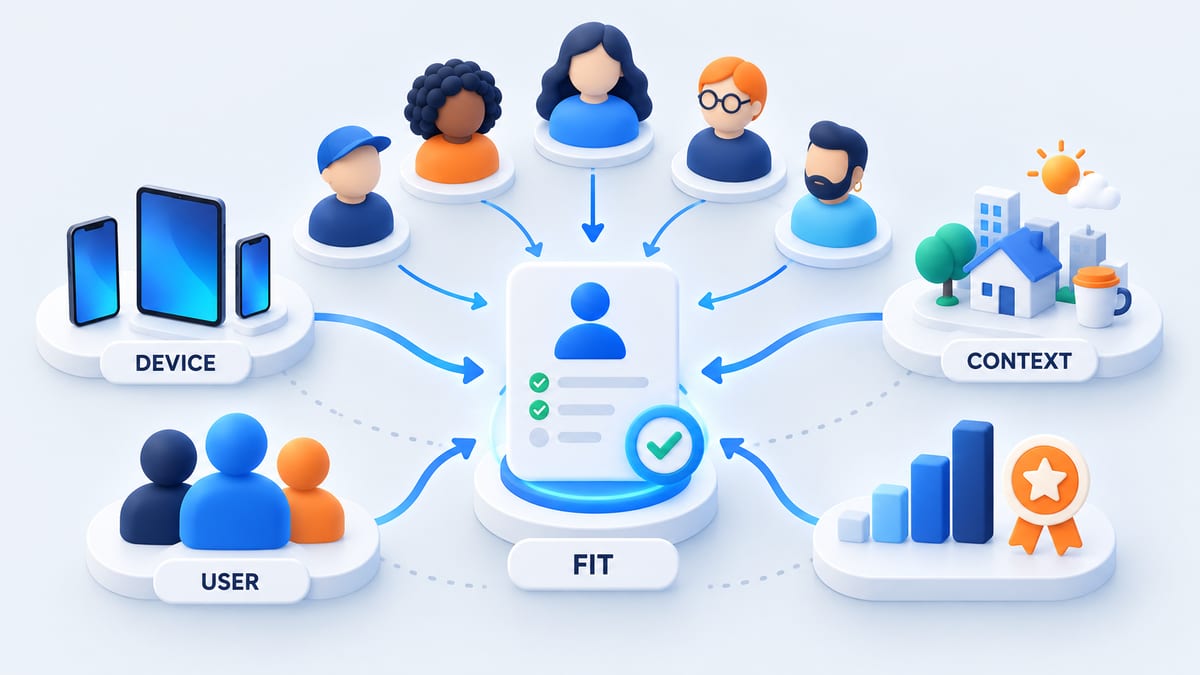
Start with the release decision. If the team needs to validate a low bandwidth upload flow, the ideal tester must encounter that network context. If the question concerns a redesigned professional workflow, recruit people who already perform that job.
Describe the ideal beta tester using only fields that change the testing decision.
- User fit such as role, experience, goal, and whether they are new or returning
- Device fit such as platform, model, operating system, screen size, and relevant hardware
- Context fit such as country, language, network, accessibility settings, and real world setting
- Participation fit such as availability, task length, communication language, and ability to share safe evidence
Avoid collecting personal data simply because it might be interesting. Explain why each screening field is needed, how it will be used, and what the tester should never include in screenshots or recordings.
Decide how many testers to recruit
Recruit from the coverage matrix rather than choosing a round number first. List the combinations that can change behavior, then assign at least one qualified person to each high risk segment. Add redundancy for critical journeys and for likely drop off.
Invitation count is not participation. Some people will miss the email, fail to install, or run out of time. Track joins, installations, mission starts, completions, actionable reports, and retests separately. This shows whether the problem is recruitment, onboarding, or the task itself.
For Google Play production access, some newer personal developer accounts currently need at least 12 testers continuously opted into a closed test for 14 days. That is a platform threshold, not proof of broad product quality. Confirm your account requirements in the official Google Play guidance.
Where to find beta testers
Use more than one source because each channel contributes a different tester profile.
Existing customers and active users
Existing users already understand the problem and can compare the beta with the current experience. Invite a targeted segment through email, an in app message, customer success, or support follow up. Do not expose an unstable build to the whole customer base.
For example, a meal planner could invite users who already save weekly recipes to test a redesigned shopping list. This channel is useful for regressions and familiar workflows; add new users separately to avoid overlooking first use confusion.
Product waitlist and early access list
A waitlist contains people who have already shown intent. Ask a short screening question when they join so device, use case, and availability are known before the beta begins. Set expectations clearly because early access is still testing, not guaranteed production service.
For example, ask subscribers who plan meals each week and own a supported iPhone to apply for one 15 minute session. A large waitlist can still have low participation if people signed up months ago. Confirm current interest before assigning coverage.
Focused online communities
Relevant forums, professional groups, Discord servers, subreddits, and local communities can reach niche audiences. Read the community rules before posting. Explain the product, required profile, time commitment, privacy boundary, and reward. Do not disguise recruitment as an independent recommendation.
Search for communities around the user problem, such as meal planning or budgeting, as well as developer testing communities. Product users can reveal usability gaps; developers and test exchange groups can help examine installation and technical behavior. Check each community's current rules and ask moderators when the recruitment policy is unclear. Do not assume any named group allows promotion.
Customer interviews and support conversations
People who recently described a problem often make thoughtful testers for a fix or redesigned workflow. Ask whether they want to join a future round rather than adding them automatically. Keep product research consent separate from marketing consent.
This is a practical starting point for a specialist app with no public waitlist. A personal invitation tied to a problem the person raised is more useful than mass messaging strangers. The limitation is scale. A few contacts may leave important devices or user types uncovered.
Platform testing links
TestFlight public links can support broader iOS recruitment and may restrict device or operating system criteria. Public link testers can appear anonymously in App Store Connect. Google Play supports controlled and open testing tracks. These links distribute builds, but the developer still needs a recruitment message and a feedback process. Review the TestFlight invitation options and Google Play testing tracks before publishing access.
A dedicated beta testing platform
BetaRoast brings the testing mission and interested testers into one workflow. Create a round with the target user, platform, device requirements, task, expected evidence, deadline, and reward when applicable. Precision helps the right people self select and reduces irrelevant applications.
Use a dedicated platform when you need to extend beyond your own audience. Inspect applicant fit before assigning a mission; access to a platform does not guarantee specialist experience, completion, or coverage of every device.
Build a beta tester recruitment funnel
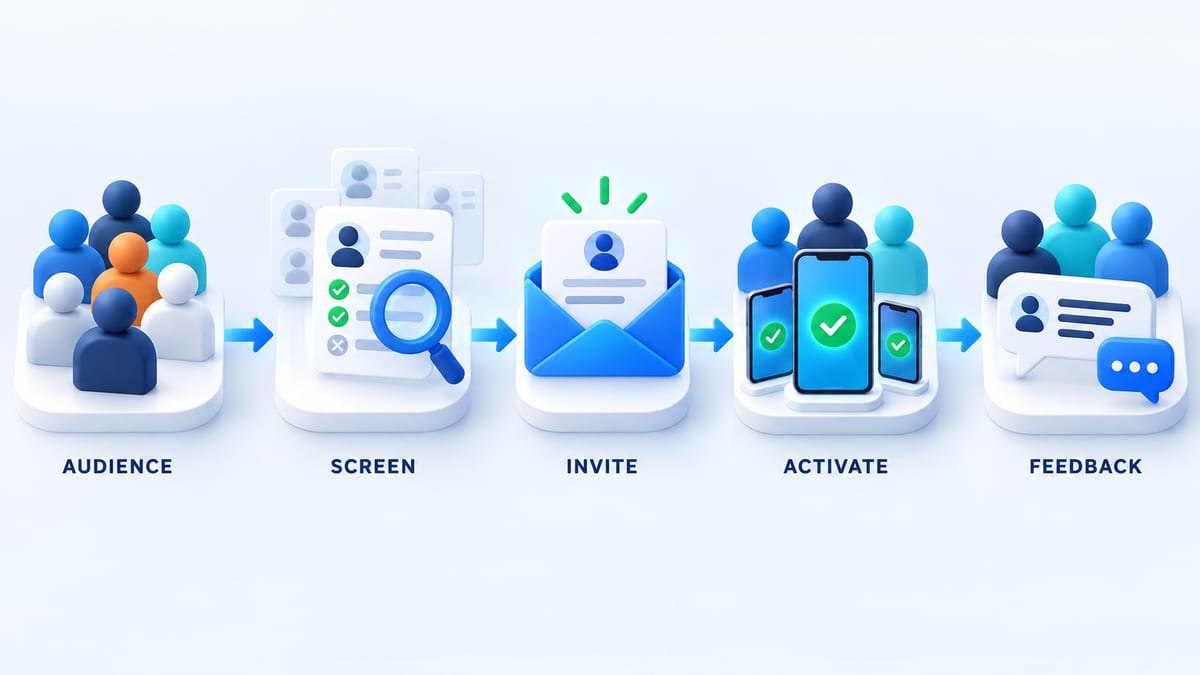
Treat recruitment as a product funnel with five stages.
Reach a relevant audience
Choose channels where the target users already spend time. Tailor the message to their motivation. Existing customers may care about improving a workflow. Community members may value early access. Professional testers may expect clear compensation.
Screen for fit
Use a short form with essential questions only. Confirm platform, device, operating system, user context, country or locale when relevant, availability, and any specialist experience. Rejecting a poor fit early respects the applicant's time.
Send a complete invitation
State who is running the test, what the app does, which build channel is used, the task, estimated time, deadline, feedback format, privacy expectations, support contact, reward, and completion conditions.
Activate with one small success
The first mission should verify installation and one meaningful action. Keep it short. If a tester cannot complete onboarding, capture that failure immediately instead of letting them disappear from the round.
Convert activity into feedback
Prompt testers at the moment when details are fresh. Ask for device, build, steps, expected result, actual result, impact, and safe evidence. Acknowledge the report and tell the tester whether it needs more detail or will return for retesting.
Calculate invitations from completed missions
The following calculation is illustrative, not a benchmark or prediction. Suppose you need 12 completed missions and assume that half of delivered invitations lead to installs, then three quarters of those installs lead to completion. You would plan for 12 divided by 0.5 divided by 0.75, or 32 delivered invitations. That estimate describes people who have already passed screening; it does not tell you how many community views or applicants you need.
Measure your own rates after the first batch. If selection is healthy but installs are low, improve the invitation or installation steps. If installs are healthy but completion is low, examine the mission, build stability, and deadline before recruiting more people. A completed mission can end in a blocker report; do not count only successful journeys as participation.
Copy these beta tester screening questions
Use this short form as a starting point and remove questions that do not affect selection.
- What do you currently use to solve [the problem], and how often do you do it?
- Have you used [app name] before? If yes, which part do you use?
- Will you test on iPhone, iPad, or Android? What is the exact device model and operating system version?
- Can you spend [estimated time] on the mission between [start date] and [deadline with timezone]?
- Which language will you use in the app and for feedback? Ask country or network questions only if the release needs them.
- Can you submit a short written report and, if needed, a screenshot with personal details removed?
- Which email should receive the invitation, and do you agree to receive messages about this testing round?
Decide selection rules before reviewing answers. For example, select people who plan meals weekly, use a supported OS, and can finish the task within the window. Balance new and returning users if both journeys matter. Do not require applicants to submit passwords, identification documents, or private customer data to prove fit.
Write an invitation that earns trust
Use direct language. Avoid hype and vague requests to try something cool.
A strong invitation explains the audience fit, the task, the time required, the build platform, the testing window, the feedback expected, the reward, and the privacy boundary. Mention known instability when it can affect the tester's device or data.
Do not call a reward guaranteed if payment depends on completion or report quality. State the criteria before installation. Never ask testers to buy gift cards, transfer money, share account passwords, disable device security, or install an unexplained profile.
Copyable recruitment post
Replace every bracketed field and check the channel's rules before posting. This example uses a meal planning app so the user fit is concrete.
We are recruiting beta testers for [app name], a meal planning app for people who cook at home and plan meals each week. We need [iPhone or Android requirements] and a mix of new and returning users. The task is to save a meal plan, add ingredients to a shopping list, and tell us where you get stuck. Allow [estimated time] before [deadline and timezone]. This is [a volunteer round or reward and exact completion conditions]. Use test data; do not enter payment information or private household details. Apply at [screening form]. We will send selected testers installation instructions and a private feedback link. Questions. [support contact].
Copyable invitation for selected testers
Subject. Your [app name] beta test. [task] by [deadline]
Thanks for applying. Your [device or user context] matches this round. Install build [version and build number] through [TestFlight or Google Play link]. Installation help. [instructions]. Your task is [one goal], starting from [new account or provided test state]. Allow [estimated time] and submit feedback at [private link] by [deadline with timezone], even if you cannot finish. Known limitations. [list]. Use [test account or safe sample data] and remove personal details from evidence. Reward and completion conditions. [terms]. If installation fails, tell us at [support contact]. Participation is optional; contact us there if you need to withdraw.
Download the beta tester recruitment template for an editable screening form, invitation, reminder, and funnel worksheet. Keep one version of the brief so the public post, selection message, and actual mission promise the same work.
Give testers a mission they can actually complete
A tester mission should describe a goal and a starting state without explaining every button. Here is an example for the meal planning app in the recruitment post.
- Install build [number] on the device listed in your application. Tell us if you cannot install or open it.
- Create a test account or use the supplied account. Avoid personal payment or household data.
- Plan one dinner for two people and add its ingredients to a shopping list. Try to do this without help.
- Close and reopen the app. Check whether your plan and shopping list are still there.
- Submit whether you completed the goal, where you hesitated, and what you expected at that point. If blocked, stop and describe the blocker rather than repeating the task indefinitely.
- For a defect, include device, OS, build, steps, expected and actual result, and a redacted screenshot when useful. Use our mobile app bug report template and examples for reproducible reports.
Estimate the time by running the task internally before publishing the brief. If the round includes an interview or a retest, say so in the invitation; do not add unannounced work after selection.
Example. Plan a first cohort of 12 testers
This is a proposed plan for an app that already has a testable iOS and Android build. Twelve is a manageable example, not a universal quality target or a substitute for a platform requirement.
- Select six iOS and six Android participants, split between new and returning users where possible. Choose actual models and OS versions from the app's support matrix.
- Seek half from a relevant customer or waitlist segment and half from a permitted community or testing platform. These are recruitment targets, not guaranteed response rates.
- Send the first batch after screening. Reserve a few qualified alternates for people who withdraw or cannot use the supported build.
- Use the first day to verify installation and address access problems. Allow the next few days for the same focused mission, with one useful reminder before the deadline.
- Review reports, fix important blockers, and invite the affected testers to a separately explained retest. Record any devices or user contexts still missing before planning another round.
For iOS, prepare the build and invitation flow using the TestFlight beta testing guide. For Android, choose a track using the Google Play beta testing guide. If your developer account has a required closed test period, plan around that requirement instead of shortening it to this sample schedule.
Screen testers without creating friction
Keep the screening form short enough to finish on a phone. Use conditional questions so an iOS tester does not see Android fields and a consumer tester does not see irrelevant business questions.
Verify technical details after selection. Ask for the exact device and operating system shown in settings, not an estimate. For a closed Google Play test, confirm that the invited Google account is the one used in Play Store. For TestFlight, explain the invitation or public link flow before the round begins.
Collect the minimum personal information required to operate the round. Store access links and participant data in tools with appropriate permissions. Provide a private route for security reports and sensitive screenshots.
Choose free or paid beta testers
Volunteer testing works when people already care about the product, community, or early access. Payment becomes more important when the audience is difficult to recruit, the session is long, specialist knowledge is required, the tester must attend at a fixed time, or the task requires repeated rounds.
Compare recruitment services or tester panels by audience fit, screening, evidence requirements, replacement policy, and total effort. Check current terms directly rather than assuming a standard price or turnaround. Free recruitment also takes time to screen applicants, answer installation questions, and follow up.
State the reward and completion conditions before people join. Pay for the agreed participation and evidence, including negative findings; never make payment depend on praise, a positive review, or an App Store rating. A mix can work. Volunteers for early product feedback and paid sessions for hard to recruit coverage.
Keep beta testers engaged
Engagement improves when the round feels finite and responsive.
- Send one clear mission instead of a long feature list.
- Use a deadline with the tester's timezone.
- Acknowledge useful reports quickly.
- Ask focused follow up questions while the context is fresh.
- Share concise release notes when a new build arrives.
- Return fixed issues to the tester who found them.
- Close the round and explain what the team learned.
Do not overwhelm testers with daily reminders. Contact people when there is a useful action, a changed build, or an approaching deadline.
Copyable follow up message
Hi [name], the [app name] testing round closes at [deadline and timezone]. If you have started, please submit [feedback link], including any blocker. If you have not installed yet, use [build link and instructions]. The agreed task is [goal] and takes about [estimated time]. Reply here if installation failed or you need to withdraw. Thanks for helping us understand [release question].
After a fix, send the new build number, the original issue, and the exact recovery check. Confirm any additional time or reward before asking for a retest. At the end of the round, acknowledge contributions and explain which problems were addressed without claiming every request will ship.
Avoid low quality recruitment
Warning signs include a sudden group of applicants with identical answers, devices outside the requested matrix, copied feedback, screenshots from the wrong build, reports with no reproduction path, and accounts focused only on rewards.
Reduce noise with a short qualification task, unique build information, clear evidence requirements, and limits on duplicate submissions. Do not remove unusual findings just because they are rare. Verify them against the environment and user impact first.
Beta tester recruitment checklist
- Write the release question and coverage matrix.
- Define the ideal user, device, context, and availability.
- Choose two or more relevant recruitment channels.
- Publish a transparent invitation with the task and reward.
- Screen only for information that affects selection.
- Over recruit carefully for expected participation drop off.
- Verify installation with one small activation mission.
- Require reproducible evidence for defect reports.
- Close the loop through acknowledgment and retesting.
- End the round with payment, thanks, and a clear data policy.
Frequently asked questions
Where can I find beta testers for free?
Start with interested customers, a waitlist, relevant communities, professional contacts, and early access applicants. Free recruitment works best when the product solves a problem the audience already cares about and the mission is short and transparent.
How do I get beta users when I have no audience?
Define a narrow user problem, write a specific recruitment brief, and start with two sources. People you can contact with a relevant reason and a community or testing platform that accepts recruitment. Offer one small mission and screen for fit. Avoid buying a large generic list; signups from people who do not need the app will not answer the product question.
How many beta testers should I invite?
Start with the user and device coverage you need, then estimate invitations using your own install and completion rates. The 32 invitations for 12 completed missions example in this guide is only illustrative. Platform minimums and sustained opt in requirements, where applicable, are separate from completion and product quality.
Does a TestFlight public link find testers for me?
No. A public link provides access to an eligible iOS beta build. You still need to share it with a relevant audience, explain the task, and collect feedback. Use a screening form first when user context or device coverage matters, and verify the current public link options in Apple's documentation.
How do I find beta testers for an iOS app?
Define the required iPhone or iPad models, operating systems, user context, and task. Recruit through existing users, communities, BetaRoast, or a TestFlight public link when appropriate. Use the iOS beta testing guide to prepare the build and feedback workflow.
How do I find testers for a Google Play closed test?
Recruit people who can remain opted in for the required period and who use the Google account invited to the test. Give them the opt in link, installation steps, mission, support route, and deadline. The Android beta testing guide explains the Play tracks and tester workflow.
Should beta testers sign a confidentiality agreement?
Use a confidentiality agreement when the unreleased product, data, or business context requires it and local legal advice supports the approach. An agreement does not replace access control, safe test data, or clear privacy instructions.
What should I ask beta testers?
Ask whether they completed the goal, where they became confused, what they expected, what happened, whether they recovered, and which environment they used. For defects, collect the build, device, operating system, reproduction steps, frequency, impact, and safe evidence.
Find the right testers for the next build
Create a BetaRoast testing round with the target user, device matrix, mission, deadline, and reward written up front. The clearer the brief, the faster qualified testers can start producing useful evidence.
To find beta testers, start with customers, a waitlist, or communities where your intended users already spend time. Choose free recruitment for a short, relevant volunteer mission; consider paid participation for specialist audiences or repeated sessions. Screen for user fit, device, operating system, and availability before sending a complete invitation. Use a small first cohort, confirm installation, and track completed missions separately from signups. The templates and illustrative funnel in this guide help you plan a round without guessing how many invitations equal useful feedback. Use TestFlight for iOS distribution or the appropriate Google Play testing track for Android, then close the loop through acknowledgment and retesting. Create a BetaRoast round when you are ready to publish the audience, task, deadline, and reward in one clear brief.