
How do you find the right Android beta testers before a preventable bug reaches Google Play?
Android app beta testing is the last useful feedback loop before a wider release. It puts a build in the hands of people who do not know the implementation, use different devices and networks, and make the decisions your team cannot simulate in a local emulator.
The best beta is not a race to collect the largest tester count. It is a controlled experiment. Define the risks, recruit the right Android users, give them clear missions, and turn their evidence into fixes. This guide covers the workflow from Google Play setup to tester feedback.
What is Android app beta testing?
Android app beta testing is a pre release test with real users using a release candidate or near release build. Testers explore the app in realistic conditions and report crashes, confusing flows, performance issues, device specific bugs, and missing use cases.
It sits after engineering and QA have established that the build is functional. It does not replace automated tests, unit tests, integration tests, accessibility checks, or internal QA. Its job is to expose the gap between “the feature works” and “a real person can complete the task without friction.”
A useful beta has three properties
- A clear hypothesis, such as “new users can create an account and finish their first task.”
- A defined tester profile, including device, Android version, country, language, and experience.
- A feedback contract that explains what to test, what evidence to include, and when the round ends.
Choose the right Google Play testing track
Google Play offers internal, closed, and open testing tracks. Choose based on the risk and audience you need to manage
- Internal testing is a fast first pass with a small, trusted group. Use it for installation, login, crash, and smoke testing before recruiting a broader audience. Google Play documents support for up to 100 internal testers.
- Closed testing is a controlled release for a defined group. Use it when you need specific device coverage, a private product experience, or a structured feedback round.
- Open testing exposes the test version to a broader Google Play audience. Use it only when the app and its listing are ready to be visible and the team can handle a larger feedback stream.
Read the current Google Play testing track guidance before configuring a release. For internal or closed testing, testers may not find the app through Play search; send the correct Play Store or opt in URL and explain which Google account must join.
Important requirement for some new personal accounts
Google Play currently says that personal developer accounts created after November 13, 2023 must run a closed test with at least 12 testers continuously opted in for at least 14 days before applying for production access. An internal test does not replace this requirement. The exact account status and production workflow belong to Play Console, so check the official testing requirements immediately before launch.
Treat the requirement as a release constraint, not as your quality strategy. Twelve people can satisfy a platform gate while still missing a broken flow, a low memory crash, or a device specific layout problem. Recruit for coverage and engagement first, then track the platform requirement separately.
Define your Android test matrix
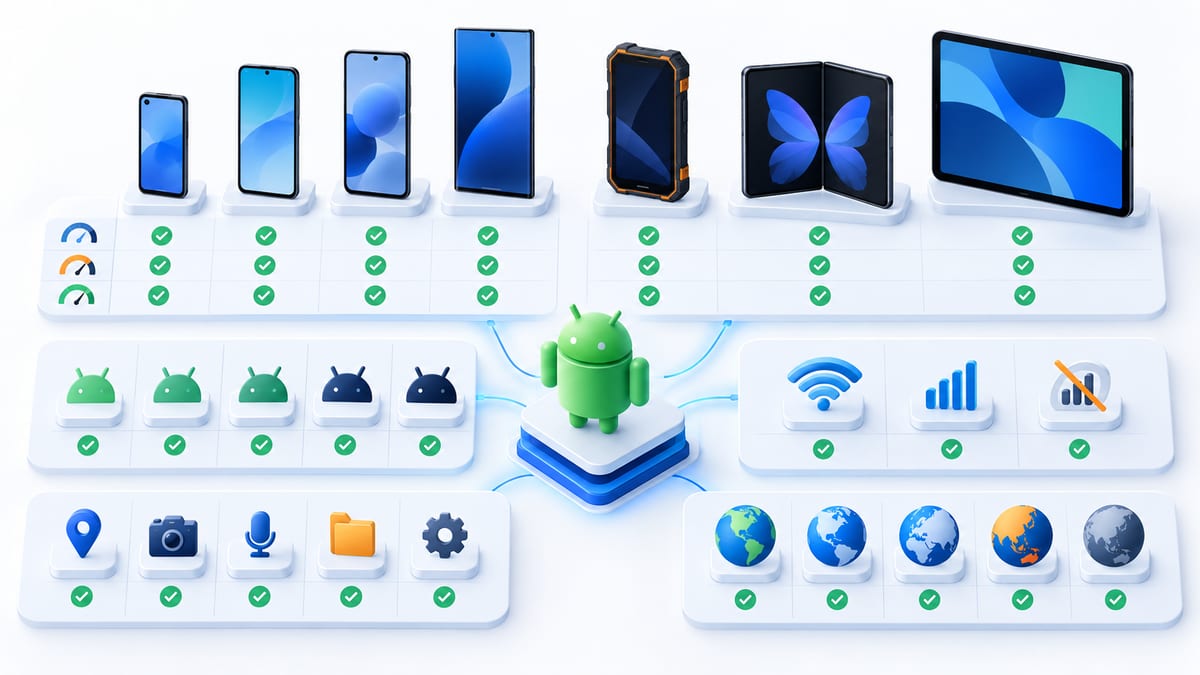
Android fragmentation is manageable when the matrix is explicit. Do not ask “Does it work on Android?” Ask which combinations matter to your product.
Start with
- Android OS versions you support.
- Low, mid, and high range device hardware.
- Screen sizes, density, orientation, and navigation mode.
- Manufacturer skins that affect permissions, notifications, background work, or battery behavior.
- Network conditions, including slow Wi Fi, mobile data, offline transitions, and interrupted uploads.
- Country, language, timezone, and locale formatting.
- Permission state, fresh install, upgrade from an older build, and a returning account.
Prioritize combinations from your analytics, support history, and target market. A small matrix with deliberate coverage is more valuable than a large list of testers who all use the same new Pixel on fast Wi Fi.
Prepare the beta build before inviting users
A tester should be able to install the build and start the mission without a meeting. Before recruitment, prepare
- A unique version code and a short release name.
- A release note that says what changed, what is intentionally incomplete, and what you want tested.
- Test credentials or a self serve sign up path that does not expose real customer data.
- Seed data or reset instructions for flows that are hard to repeat.
- A support channel and a deadline, including the timezone.
- Crash and performance monitoring that separates beta traffic from production.
- A short privacy note explaining what data the beta build collects.
Write the mission before the invitation. If your team cannot describe the expected behavior in one or two sentences, the build is probably not ready for a useful external round.
Recruit the right Android beta testers
Recruitment is a matching problem. You need people who have the right device and the right context, not just people who agree to install an app.
Screen for
- Device model and Android version.
- Country, language, and network conditions.
- Whether the person is a new user, existing customer, or power user.
- Whether they can complete the required task during the test window.
- Any accessibility needs relevant to your product.
- Whether they can share screenshots, screen recordings, and reproduction steps without revealing sensitive data.
BetaRoast is a natural fit for this step. Create an Android testing round, describe the mission, and recruit testers whose device and context match the round. For Google Play closed testing, keep the tester’s Google account email and Play opt in state aligned with the account they use to install the build.
Do not promise payment unless the round actually includes a clear reward. If a reward is offered, state the eligibility, completion criteria, timing, and any geographic restrictions before the tester joins.
Write missions that produce actionable feedback

“Try the app and tell us what you think” produces opinions but weak debugging evidence. Give each tester a short sequence of tasks
- Start from a defined state, such as a fresh install or an existing account.
- Complete one realistic goal.
- Try one edge case, such as denied permission, interrupted network, or an empty state.
- Repeat the most important action after reopening the app.
- Record anything that blocks the expected outcome.
Ask testers to report findings with this structure
- Title one observable problem.
- Environment device, Android version, app build, network, and account state.
- Steps numbered actions that reproduce the problem.
- Expected what should happen.
- Actual what happened instead.
- Evidence screenshot, screen recording, log, or timestamp.
- Impact blocker, high, medium, or low.
The quality of the first report matters more than the number of comments. Show testers one example of a good report before the round starts.
Run the round and triage findings
During the round, watch for installation failures, testers who never opt in, duplicate reports, and issues that only occur on one device family. Keep product suggestions separate from confirmed defects so the team can prioritize without losing useful context.
A simple triage order works well
- Blockers. Crashes, data loss, broken sign in, or a path that prevents the core task.
- High impact. A major feature fails for a meaningful segment or a workaround is unclear.
- Medium impact. Confusing behavior, poor recovery, or a device specific defect.
- Low impact. Copy, spacing, minor visual issues, or enhancement ideas.
Reply to testers when a report is accepted, needs more information, or is fixed for retest. Closing the loop increases participation and prevents the same issue from being reported repeatedly.
How many Android beta testers do you need?
Use the minimum number required for your platform and risk, then add coverage deliberately. A consumer app with a large device range needs more variation than an internal B2B tool with one supported configuration. A payment flow, background sync feature, or camera workflow deserves more targeted testers than a static settings screen.
For a first external round, plan a mix of
- Users who match your primary customer.
- A few testers on older or lower end devices.
- At least one slow network or intermittent connectivity case.
- Testers who have not seen the product before.
- A small number of power users who will push edge cases.
The goal is not a perfect statistical sample. The goal is to find high impact failures before they become production reviews, support tickets, or lost users.
Safety and privacy for testers
Beta builds can be less stable than public versions. Google advises users that early access and beta apps may crash or have features that do not work properly. Testers should use non sensitive data, avoid production credentials where possible, and know how to leave the program.
For a tester, leaving a public Android beta usually means opening the app’s Play Store page, going to the beta section, and choosing to leave. A tester who leaves should also follow the developer’s uninstall or data reset instructions if the beta changed local state. Link to Google’s tester guidance for the current user steps.
For developers, do not put secrets, real payment details, or unnecessary personal data in a beta task. Mask screenshots before sharing them internally, retain only the feedback evidence you need, and tell testers where to report security issues privately.
Android app beta testing checklist
- Pick internal, closed, or open testing based on the round’s risk.
- Confirm the Play Console account requirements and release status.
- Define supported devices, Android versions, locales, and network cases.
- Prepare a clean build, release notes, credentials, and reset instructions.
- Recruit testers who match the matrix instead of only maximizing volume.
- Give every tester a short mission and a deadline.
- Require device, build, steps, expected result, actual result, and evidence.
- Triage blockers first and send fixes back for retesting.
- Track Google Play’s opt in requirement separately from product quality.
- Remove sensitive data and close the round with a clear summary.
Frequently asked questions
Is it safe to join the Android beta program?
Usually, but treat a beta as experimental software. Use a separate account or test data when possible, avoid entering sensitive information, and expect occasional crashes or incomplete features. Read the developer’s privacy and support instructions before installing.
How do I become an Android app beta tester?
Join a developer’s early access, open, or closed test, then opt in with the Google account that will install the app. On a private round, you may need an invitation or an approved tester list. BetaRoast can help you discover testing rounds that match your device and complete the requested mission.
How much do Android beta testers get paid?
There is no universal rate. Some teams offer a reward, some recruit for early access or contribution history, and some run unpaid research. Confirm the reward and completion criteria before accepting a round.
Can I use TestFlight for Android app testing?
No. TestFlight is Apple’s beta distribution service. Android apps normally use Google Play internal, closed, or open testing tracks, with the tester joining through the appropriate Play Console flow.
How do I find Android beta testers?
Start with your target device and user matrix, then recruit through a community, existing users, or a platform such as BetaRoast. A good recruitment brief states the app category, Android versions, required task, time commitment, feedback format, and any reward.
Ready to run a better Android beta?
Create a BetaRoast testing round with the device requirements and mission written up front. The more precisely you define the round, the more useful the feedback will be when your next Android build is ready.
A useful Android beta is a focused release experiment, not a race to collect installs. Start by deciding which Google Play testing track matches the risk, then build a coverage matrix around the devices, Android versions, locales, permissions, and network conditions your real audience uses. Recruit testers who match those conditions and give each person a short mission with a clear starting state and expected outcome. Require evidence that an engineer can act on. Include the build number, device, reproduction steps, expected behavior, actual behavior, and a screenshot or recording when it is safe to share. Triage blockers first, send fixes back for retesting, and keep platform requirements separate from product quality goals. When Android app beta testing is structured this way, every round produces more than comments. It creates evidence for a release decision. BetaRoast helps turn that plan into a testing round on real devices with matching testers, explicit tasks, and feedback your team can use before production.