
A successful biometric prompt proves little if the server accepts the wrong account or a reused challenge.
Passkey testing verifies that a website registers a credential for the intended account, validates each authentication response on the server, and gives users a safe way to recover when their browser, device, or credential is unavailable. Combine controlled server fixtures, browser automation, and physical device journeys. A completed system prompt alone does not prove correct sign in.
This guide targets web authentication engineering rather than native app integration. All scenarios are proposed tests, not reported experiments or measured results. The hypothetical LedgerDesk service uses two synthetic accounts on an isolated staging domain. Run security assertions only against your own authorized staging system, with disposable credentials and no customer data.
Build a repeatable passkey testing workflow
Understand how passkeys establish trust
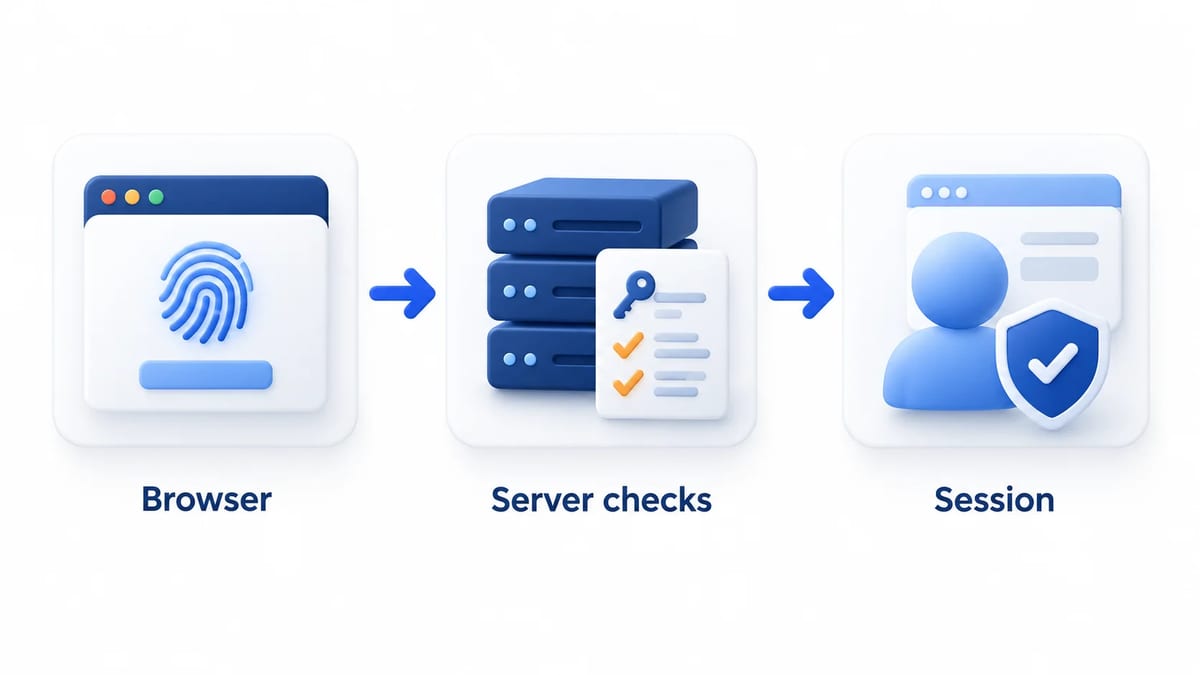
An authenticator uses a private key to produce a response that the server checks with its stored public key. A password manager may manage a synced passkey; a security key may hold a device-bound credential. As FIDO explains, biometric verification happens locally. The browser's WebAuthn response and your server receive verification evidence, not fingerprint or face data. Passkeys resist phishing through relying party scoping, but account recovery and enrollment still need their own security checks.
Establish the account and environment contract
Record the frontend build, backend revision, verifier library version, browser, operating system, passkey provider, origin, and relying party identifier, or RP ID. Define whether user verification is required, which fallback methods exist, and how adding another credential is authorized.
The FIDO implementation overview provides a starting point for implementation planning. Translate your chosen policies into assertions rather than assuming every provider behaves identically.
Follow one credential through its lifecycle
- Prepare accounts A and B and confirm their initial credential records.
- Register a passkey for A and verify the persisted ownership.
- Sign out, authenticate, and inspect the resulting session identity.
- Run isolated rejection fixtures with fresh state for each case.
- Repeat conditional UI and supported physical device journeys.
- Revoke the credential and test another sign in and recovery.
Record expected database changes and session effects before execution. Keep frontend failures distinct from verification failures. Otherwise, a broken request decoder can make every negative fixture appear secure without reaching the intended validation branch.
Verify registration beyond the creation prompt
Bind creation to a verified account
The web.dev registration guide separates local credential creation from storing the corresponding public key on the server. Authorize enrollment through your account policy before invoking creation. In the hypothetical LedgerDesk case, account A must remain the enrollment owner even if a submitted form contains B's identifier.
Verify the user handle, RP ID, supported algorithms, discoverable credential requirement, and duplicate exclusion options. Check binary field serialization with known fixtures. A malformed base64url conversion should fail visibly rather than silently producing a different identifier.
Commit only a verified registration
Use the server registration guide to understand the verification and persistence boundary. Persist the credential ID, public key, owner, and relevant authenticator metadata only after verification succeeds. Protect uniqueness across accounts and exercise two competing registration completions.
Propose an interrupted case where creation succeeds locally but the server write fails. The page must not announce completed enrollment. Retry deliberately, then inspect whether a stray local credential or duplicate server record remains. Verify that account notifications and management entries represent committed registration, not merely a resolved browser promise.
Assert authentication and session identity
Verify the assertion before establishing a session
The official server authentication guide describes credential lookup and signature verification. Test against the stored public key and configured verification expectations. A client field saying authentication succeeded has no authority to establish the session.
For a username-first flow, assert that the accepted credential belongs to the selected account. For a discoverable flow, resolve the credential and returned user handle consistently to their stored owner. The hypothetical LedgerDesk fixture submits A's valid credential while B is the selected account. The username-first request must fail without creating a session for either user.
Inspect the protected destination
After successful authentication, request an authenticated endpoint and verify the server's account identity. Check session rotation according to your session policy, then sign out and confirm protected access ends. A welcome label can be stale even when the session belongs to someone else.
Include an unknown credential ID, a signature that does not verify, and a disabled account. Confirm that each rejected attempt leaves protected state inaccessible. Record internal failure categories without exposing credential existence or account details in public error messages.
Exercise server validation with negative fixtures
Map fixtures to the verifier contract
WebAuthn section 7 defines registration and assertion verification, including ceremony type, challenge, origin, RP ID hash, flags, and credential ownership checks. Use a maintained verifier and test its configuration as well as your endpoint wiring.
Start with a known valid staging fixture. Change one property at a time and assert the intended rejection reason internally. Arbitrarily corrupting a signed payload can fail signature validation before exercising a later check. Use a controlled fixture signer where needed to reach the target branch.
Reject the wrong origin and RP ID
Configure expected origins explicitly. Supply a response for an unapproved staging origin, then a correctly signed fixture with the wrong RP ID hash. Neither should establish authentication or register a credential. Keep origin and RP ID expectations separate, following the RP ID guidance.
For both registration and authentication, also inspect the cross-origin embedding context under the WebAuthn verifier contract. Reject unexpected cross-origin use and an unapproved top origin even when the response origin itself is allowed. If your product supports embedded ceremonies, include a permitted embedding fixture and its configured permissions alongside rejection cases.
Reject expired and reused challenges
Generate unpredictable challenges server-side and bind them to the intended ceremony and transaction. Define server expiry separately from the browser prompt timeout. In proposed fixtures, complete after expiry, replay an accepted response, and submit two simultaneous valid completions. Assert single use through atomic server consumption, not a client loading flag. Your failure policy should also define when abandoned or rejected challenges become invalid.
Enforce presence, verification, and ownership
Where policy requires user verification, reject a validly signed assertion without the UV flag. Test required presence according to the ceremony, and reject a credential or user handle mapped to another account. Include the wrong ceremony type and a registration response submitted to authentication. No rejection may create a session or attach a credential.
Test conditional UI and deliberate fallback
Detect capabilities without assuming a credential exists
The form autofill guide explains conditional mediation and the username input's autocomplete="username webauthn" annotation. Feature-detect PublicKeyCredential and supported capability methods. Where available, inspect getClientCapabilities() and conditionalGet; support older detection paths such as isConditionalMediationAvailable() according to your browser policy.
Capability support does not prove that this user has an available passkey. Test a supported browser with no credential, an unsupported capability, and a provider requiring unlock. Password or recovery controls must remain understandable while the conditional request stays pending.
Cancel pending work when the journey changes
Abort the pending request before starting another WebAuthn operation or leaving the screen. Propose navigation away, switching accounts, choosing a password, cancelling the system prompt, and returning through browser history. Assert that stale responses cannot overwrite a later successful session.
Do not classify every NotAllowedError as an incorrect credential; cancellation and other conditions can share that error. Check actionable messaging, retry, keyboard focus, and loading state. Use your accessibility testing checklist for transferable focus and assistive interaction checks, while evaluating the website's actual controls.
Automate with virtual authenticators carefully
Configure the authenticator you intend to test
Chrome DevTools WebAuthn supports virtual authenticators with configurable protocol, transport, resident keys, and user verification. Use a CTAP2 fixture with discoverable credentials for the corresponding flow. Maintain distinct fixtures for required verification and deliberately missing verification.
In a proposed automated run, register through the page, inspect the server record, then authenticate through the page using that credential. Create a fresh authenticator and account state per isolated case. Remove them during teardown so tests cannot pass because a previous run left a credential behind.
Keep the Chromium boundary explicit
Playwright's CDPSession API exposes protocol commands and events. Its newCDPSession documentation states that CDP sessions are supported only on Chromium browsers. Record the browser and protocol versions used by the harness and review command support when upgrading.
Virtual authenticators provide repeatable protocol coverage. They do not establish the behavior of Safari, Firefox, physical security keys, biometric dialogs, provider sync, or Bluetooth proximity. Auto-approved virtual user presence can also conceal an unusable cancellation path. Label automated evidence with its actual scope.
Cover physical devices and cross-device sign in
Build a matrix around supported user journeys
Select desktop and mobile browsers, operating systems, providers, and security keys from your support policy. Include a locked provider, multiple accounts, private browsing where supported, and a device with no local credential. Record the provider used instead of describing every result as simply an iPhone or Windows passkey.
Include Windows Hello when supported, covering its configured local verification and cancellation paths. Distinguish cross-platform browser coverage from the WebAuthn cross-platform authenticator attachment value; they describe different dimensions of the matrix.
FIDO's passkey overview distinguishes synced and device-bound credentials. Test each supported category deliberately. A provider-backed passkey appearing on a second device and a phone authenticating a desktop request are different journeys with different dependencies.
Observe the complete cross-device journey
For a hypothetical desktop-to-phone case, start sign in on the desktop, select the phone option, complete the system-directed QR and proximity flow, and assert the desktop session owner. Repeat with Bluetooth unavailable, an interrupted connection, cancellation on the phone, and an expired server challenge.
Record both devices and the observed path. Do not infer cross-device authentication solely from authenticatorAttachment="cross-platform"; a roaming security key can also use that attachment class. Avoid capturing usable QR payloads or secrets in shared evidence. Restore device settings after each controlled interruption.
Verify synced credentials recovery and revocation
Recover without silently weakening enrollment
The FIDO deployment white paper treats registration, authentication, and recovery as connected deployment concerns. Document how a user regains access when a provider account or every device becomes unavailable.
Propose recovery for a synthetic account using your approved fallback, followed by enrollment of a replacement credential. Assert the required identity checks and account notifications. Distinguish restoring provider access from your service's own account recovery. A synced credential is not a guarantee that the user can recover the provider account.
For a lost-device fixture, attempt access from a remaining enrolled device before testing full recovery. If password fallback exists, verify its established protections and authorization for adding a replacement passkey. Losing a device must not turn knowledge of an account email into permission to enroll a new authenticator.
Revoke at the server and inspect stale suggestions
Remove or disable A's credential at the relying party and attempt authentication from every supported copy. The server must reject it even if a provider still offers it. Test other valid credentials separately and define whether revocation also ends existing sessions; credential revocation alone does not implement that application policy.
Deleting a provider's local passkey does not necessarily remove its server record. Removing the server record does not guarantee immediate deletion of synced copies. Test these directions separately, including a surviving copy offered after revocation, and explain which credential the management action affects. Keep account deletion as a distinct lifecycle operation.
Chrome's Signal API guidance describes notifying providers about server credential changes. Feature-detect signals and treat provider cleanup as best effort. With signals absent or delayed, keep server rejection authoritative and give users a clear management or recovery route.
Preserve evidence for the release decision
Report the assertion that failed
Attach redacted transaction references, fixture category, expected owner, server result, and observed browser state. For physical journeys, include device, OS, browser, provider, and cancellation point. Keep challenges, session cookies, private keys, and full credential payloads out of shared reports.
Use the bug report guide for reproducible steps and expected versus actual behavior. State whether the failure reached the verifier, failed before submission, or occurred after authentication. That distinction directs the investigation to the right boundary.
Gate on explicit coverage
Require accepted registration, correct session ownership, targeted rejection fixtures, cancellation recovery, supported device journeys, and revoked credential rejection. Mark unsupported or untested combinations explicitly. Repeat affected cases after verifier, browser, origin configuration, or enrollment policy changes.
Create a BetaRoast testing round with a focused sign-in mission, supported browser requirements, synthetic accounts, and safe evidence instructions. Keep controlled security fixtures with the engineering team; ordinary tester journeys can reveal confusion and recovery friction without requesting access to internal validation tools.
Frequently asked questions
What should passkey testing cover first?
Start with registration ownership, server assertion validation, and the authenticated session's account identity. Then add challenge expiry and reuse, cancellation, device coverage, recovery, and revocation.
Can Playwright test passkeys across every browser?
Playwright can run browser journeys, but its CDP session approach to virtual authenticators is Chromium-specific. Physical browser and provider checks remain necessary for your supported matrix.
Does a biometric prompt prove user verification succeeded?
No. Enforce the server's verification policy against the authenticator data. Test a validly signed response without UV when your policy requires it.
Does deleting a passkey end existing sessions?
Not automatically. Reject subsequent use of the revoked credential, and separately test whatever session invalidation behavior your application promises.
Validate registration and authentication separately, reject controlled negative fixtures on your own staging system, and prove challenge consumption and credential ownership. Combine virtual authenticator automation with supported physical browsers, providers, and cross-device journeys. Release against recorded recovery and revocation contracts rather than a successful prompt alone.