
Opening the app is only the first checkpoint. A reliable Universal Link reaches the intended screen in the right account and device context.
iOS Universal Links testing verifies more than whether a website URL launches an app. The signed app must declare the domain, the website must authorize that app and URL, the device must recognize the association, and the app must deliver the intended content safely.
This guide uses a fictional TrailNote app and synthetic links under links.example.com. Replace those placeholders with your own build artifacts and domain. The examples are proposed test cases, not claims of hands-on results. For distribution planning, see the iOS beta testing guide.
Follow a repeatable Universal Links testing workflow
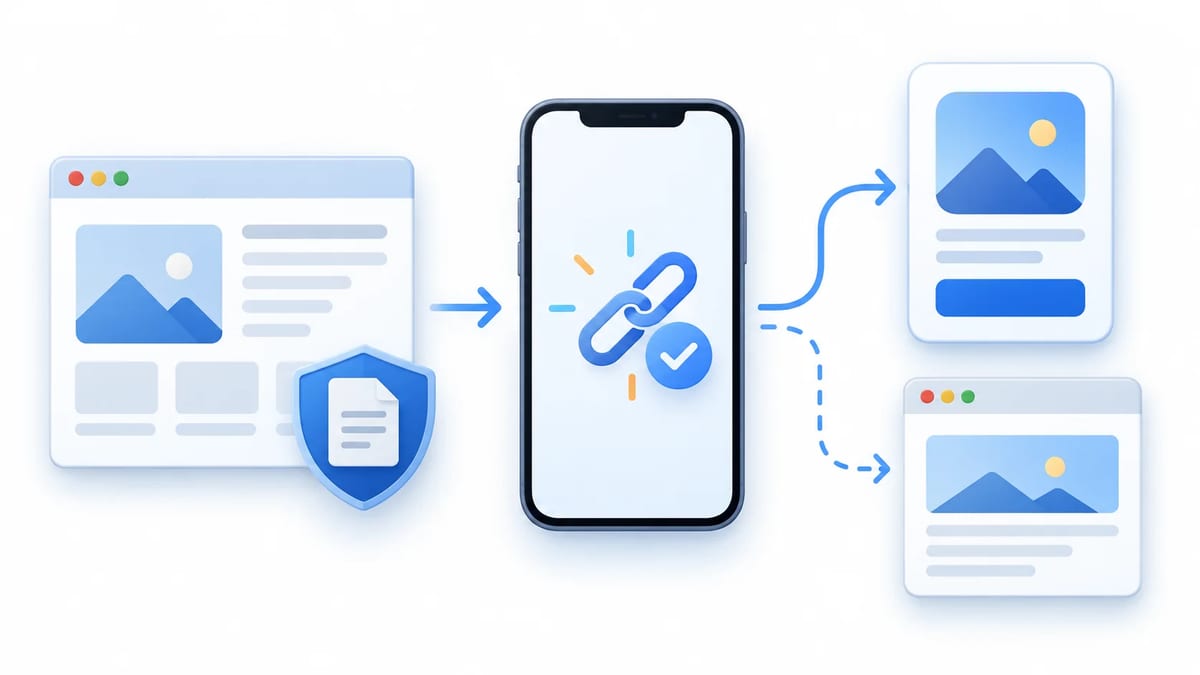
Separate the investigation into observable checkpoints so a browser preference does not send someone rewriting a correct router.
- Identify the installed build and verify its signed entitlements.
- Check HTTPS delivery and the AASA rules for the exact hostname.
- Establish real-device association and link-opening context.
- Observe the activity delivered to the app's lifecycle handler.
- Verify destination, account access, recovery, and web fallback.
Record device model, OS, build number, installation channel, source app, exact synthetic URL, account state, and expected destination. Also record whether the app was terminated, foregrounded, or suspended. These details make two apparently identical failures comparable.
Apple's TN3155 debugging guide provides the core diagnostic workflow. Use it alongside the entitlement, URL-pattern, and UIKit references below.
Check Associated Domains entitlements and App ID
Match the application identifier precisely
Inspect the signed artifact corresponding to the version installed on the test device. An Xcode project setting alone cannot establish what an exported or re-signed build contains. Run codesign -d --entitlements :- "Payload/TrailNote.app" against an extracted distribution artifact and examine application-identifier and com.apple.developer.associated-domains.
The AASA application's identifier must match the signed app's complete application identifier. Its format is an application identifier prefix followed by the bundle identifier. Do not automatically substitute the Team ID. Apple's signature troubleshooting technote explains that the App ID prefix and Team ID can differ.
If device evidence disagrees with your local archive, verify which artifact was actually distributed before editing the website. Maintain separate expectations for production and beta bundle identifiers.
Check the installed build's identity
Compare the device's version and build number with the retained distribution record. For ABCDE12345.com.example.trailnote, confirm every character rather than accepting a matching suffix. Include only app identifiers intentionally authorized for that domain.
Check the exact associated hostname
The entitlement needs applinks:links.example.com, not a full URL, route, port, or trailing slash. Apple's associated domains setup describes the two-way relationship between the website and signed app.
Keep explicit subdomain entries distinct from wildcard entries. applinks:*.example.com does not include the bare example.com. An explicit applinks:links.example.com requires AASA at that hostname; the wildcard association uses the parent domain's AASA. Check the configuration actually selected for the host instead of assuming every subdomain inherits an explicit entry's file.
Validate the AASA file and JSON rules
Inspect the HTTP response without following redirects
The Apple App Site Association file authorizes the app identifiers and URL rules for your website. Request https://links.example.com/.well-known/apple-app-site-association. The filename has no .json suffix. Serve valid JSON over HTTPS with a valid certificate, without redirects. The response should deliver the file directly, with an appropriate JSON content type, rather than a login page or bot challenge.
Use curl -i https://links.example.com/.well-known/apple-app-site-association and inspect both headers and body. Avoid -L during this check because following a redirect can conceal the defect. Verify public access beyond your office network, including security rules that discriminate by geography, IP address, or user agent.
Save the inspected response as a local fixture for review. A local filename such as aasa.json is fine; it does not change the required public endpoint. Preserve the deployed revision with your test evidence.
Exercise components as an ordered decision list
Use the modern appIDs and components format consistently instead of combining it with legacy path rules. Apple's components reference specifies first-match behavior. Every component supplied within one rule must match.
For a synthetic policy, place {"/":"/trips/private/*","exclude":true} before {"/":"/trips/*"}. Otherwise, the broader positive match can win first. A preceding {"#":"stay_on_web","exclude":true} can reserve a fragment for browser navigation.
For a separate help route, {"/":"/help/*","?":{"article":"????"}} requires a four-character query value. The /, ?, and # keys represent path, query, and fragment. An omitted component defaults to matching everything, so do not assume extra query items prevent association.
Check boundaries around every rule
Test /trips/42, /trips/private/42, /trips/42#stay_on_web, and an unrelated path. Check case changes, trailing slashes, missing query values, percent encoding, and neighboring prefixes. Define the expected app or browser outcome before executing each case.
Use sudo swcutil verify -d links.example.com -j ./aasa.json -u https://links.example.com/trips/42 for a local matching check. Repeat with an excluded URL. This narrows a rule defect; it does not prove that an iPhone has downloaded that revision.
Validate the association contract in CI
Version the AASA file fixture alongside positive and excluded URLs with their expected app identifiers and outcomes. In macOS CI, run swcutil verify for each case and assert the reported match or blocked match for the intended app; a successful process exit alone is not evidence of the expected decision. Check the origin endpoint without following redirects, assert its HTTP status and JSON content type, and validate the JSON structure against a schema maintained for your chosen AASA format. Compare signed-artifact entitlements with the expected identifier and domains, then run router unit tests for accepted, malformed, and unauthorized destinations. Keep staging developer-mode results separate from production CDN checks, and retain a release gate requiring the distributed build to complete real-device journeys.
Understand the Apple CDN and developer mode
On iOS 14 and later, production associated-domain retrieval uses Apple's CDN. An origin response therefore does not establish what a device currently knows. Preserve when AASA changed and when the app was installed. Reinstallation can trigger another retrieval, but cannot guarantee immediate origin freshness or invalidate the CDN.
For development, Apple's Associated Domains Entitlement reference documents applinks:links.example.com?mode=developer. This is an entitlement entry for an eligible development-signed app with device opt-in. It is not a parameter to append to the link someone clicks.
Keep a development association test separate from a TestFlight or production test using ordinary entitlements. A direct-server pass can help isolate a CDN-related difference, but is insufficient release evidence. Do not promise a fixed propagation interval. Compare the available device diagnostics and repeat the real distribution scenario after the configuration is stable.
Test Universal Links on a real iPhone
Establish a Notes baseline
Paste a candidate link into Notes on an iPhone with the target build installed. Long-press it and inspect the app and browser choices. Select the intended option and record it, because the choice affects later behavior for that domain. TN3155 also documents associated-domain diagnostics under Developer settings for eligible devices.
Then test the actual entry channels your users rely on, such as Messages, Mail, and a supported browser. Record whether a channel wraps links through tracking or an embedded browser. A shortened campaign URL and a direct associated URL are different experiments.
Distinguish browser intent from association failure
Typing or pasting the URL into a browser address bar is direct web navigation. It is not the same test as tapping a link from another app. Safari also generally keeps same-domain navigation in the browser, as Apple's link behavior guidance explains.
If the product needs a deliberate browser-to-app transition, evaluate a correctly associated different subdomain and test the actual button journey. Confirm behavior in each supported browser because third-party implementations can differ. Avoid diagnosing a working association as broken solely because Safari stayed on the website.
Verify cold and warm UIKit scene delivery
The incoming NSUserActivity should have activityType equal to NSUserActivityTypeBrowsingWeb; read its webpageURL. Apple's Universal Links handling guide covers app delegate and scene-based delivery.
For scene-based UIKit apps, inspect connectionOptions.userActivities in scene(_:willConnectTo:options:) when a link creates a scene. The connection options reference describes activities available at connection. Select the relevant browsing activity rather than assuming the first activity is always your link.
For an existing running or suspended scene, handle scene continuation through scene(_:continue:). An app without scenes uses application(_:continue:restorationHandler:). Check the lifecycle model your app actually adopts.
Send each delivery path through one route parser and coordinator. Queue a validated destination until scene setup and navigation are ready. Test terminated launch, foreground delivery, background return, and multiple windows if supported. Observe both callback arrival and the resulting visible screen.
Use xcrun simctl openurl booted https://links.example.com/trips/42 as a convenient simulator exercise. A simulator success is useful routing evidence, not proof of production association on a physical device.
Validate routes and resume safely after sign-in
Treat the URL as untrusted input
Use URLComponents and an explicit allowlist for schemes, exact hosts, routes, and accepted parameters. Avoid substring host checks that accept links.example.com.attacker.invalid. Define handling for duplicate query keys and reject malformed identifiers before loading content.
An association authorizes the app to receive a URL; it does not authorize the person to view its resource. Check access on the server. Test deleted trips, revoked invitations, and a trip owned by another account. Show a recoverable unavailable state without leaking private details.
Reject arbitrary redirect targets and privileged actions. Opening a trip must not silently delete content, purchase something, or change membership. Log route categories and outcomes without collecting tokens or private query values.
Preserve a pending destination through authentication
For a signed-out user, retain a validated destination while presenting sign-in. After authentication, recheck access and resume once. Test successful login, cancellation, account switching, and an expired invitation. A canceled sign-in should leave an understandable recovery path.
Make routing idempotent so repeated delivery or navigation restoration cannot create duplicate screens or repeat an action. Test a second tap while authentication is pending. Define whether the newer destination replaces the earlier one, and keep that decision consistent. Suppress duplicate work within the active flow while allowing an intentional later revisit.
Confirm web fallback and collect release evidence
With the app absent, the ordinary URL should reach useful web content. Also test a person who deliberately chose the browser. Universal Links do not automatically send users to the App Store or preserve a deferred destination across installation. Any installation handoff requires a separately designed and tested product flow.
Give testers a small assignment with explicit starting state and expected destination. A useful report distinguishes browser opening, absent activity delivery, wrong screen, and denied account access. Attach redacted evidence using the mobile bug report guide, then retest the same context on the corrected build.
Use a BetaRoast testing round to assign real-device journeys across installation and account states. Release evidence should show successful destinations and intentional exclusions, not merely a collection of app launches.
Frequently asked questions
Why does a valid link still open in Safari?
Check the source of navigation, the person's browser choice, and the device's association state. Address-bar entry and same-domain browsing can legitimately stay on the web. Repeat a controlled Notes test before changing code.
Does a successful AASA download prove Universal Links work?
No. It verifies that response from that network. Signed identity, matching rules, device association, user preference, lifecycle delivery, and destination behavior still need evidence.
Can developer mode replace a TestFlight test?
No. Developer mode can isolate origin association problems for eligible development builds. Verify the actual TestFlight build on a physical device through the production association path as well.
Should the app remember a link after sign-in?
Usually, when the destination remains valid and accessible. Retain a validated route, recheck authorization, and resume once. Test cancellation and account changes so recovery does not reveal another person's content.
Test the signed build, the hosted AASA rules, the device's association and user preference, and the app's routing separately. Then connect those checks with a real-device journey covering cold and warm scenes, sign-in recovery, unavailable content, and web fallback. Keep simulator routing and developer-mode results distinct from production association evidence.