
A translated checkout can still charge the wrong currency, lose an unfinished form, or read a confirmation in the wrong language.
Localization testing checks whether people can complete an application's tasks in each supported language and regional configuration. It covers translated content, formatting, input, navigation, and recovery. The scenarios and expected outcomes below are hypothetical test designs, not reports of experiments or production measurements.
Start with a purchase or booking that crosses several boundaries. A customer chooses French text, keeps a Canadian billing address, and travels to another time zone. The app must preserve the agreed price and booking instant while changing presentation. A screenshot of the welcome screen cannot establish that behavior.
Internationalization and localization
Define what a passing test establishes
Internationalization, often abbreviated i18n, prepares the software to support different languages and conventions. Localization, or l10n, supplies the content and adaptations for a particular audience. Functional localization QA checks resource selection, formatting, and usable UI controls. Native linguistic review checks meaning, terminology, tone, and cultural relevance in context.
Assign separate acceptance criteria. An automated assertion can establish that a cancellation dialog loads the expected resource and preserves its placeholder. A native reviewer must decide whether that dialog clearly communicates the consequence. Give translators the action, screen context, and variable meaning. Apple's string catalog guide describes comments and language specific plural variants that help carry this context into implementation.
Record who owns each failure. A broken placeholder belongs with engineering; an ambiguous cancellation verb needs the language reviewer and product owner. Resolve disagreements against the intended user action before approving replacement wording.
Build a repeatable localization testing workflow
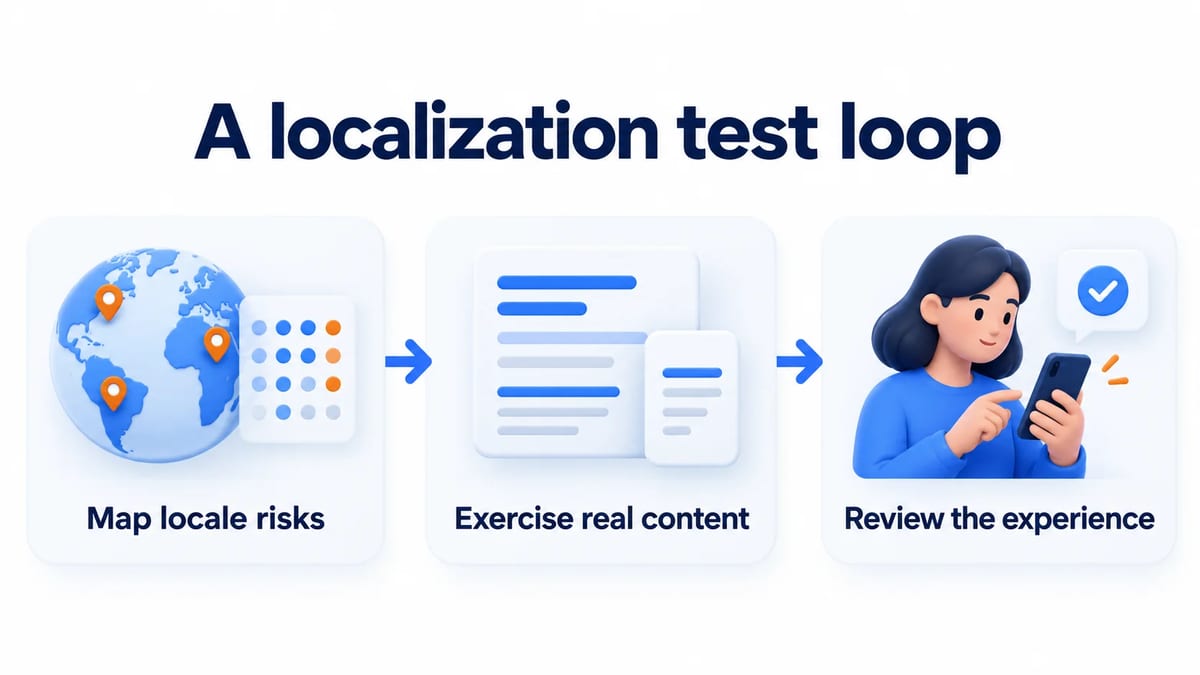
Run one journey through explicit acceptance criteria
Map locale risks
Choose a small blocking suite around the product's most consequential task. For a booking app, cover selecting a slot, entering a name, confirming the price, and reopening the confirmation. Write expected business values before writing display assertions. Record app language, formatting region, time zone, calendar, currency code, and platform version separately.
Select locales for distinct risks. German can expose long labels; Arabic exercises bidirectional content; Japanese exercises input composition. Include a regional variant and an unsupported language. This selection supplements coverage for every language you actually ship. Prioritize combinations by changed components and user impact, and keep the omitted combinations visible in release notes for QA.
Exercise real content
Load realistic translated messages and synthetic customer data into the release candidate. Include empty results, validation errors, and a populated confirmation with a long name. On Android, run the pseudolocale checks for expansion and directionality during development. Pseudolocalization exposes structural defects but cannot verify translation accuracy.
On iOS, select App Language and App Region independently in the Run scheme, following Apple's localization testing instructions. Also exercise the supported device settings path. A scheme override alone does not test a customer's language switching journey or saved preference.
Review the experience
Ask native reviewers from the target market to complete the same booking without instructions that reveal the expected button. Observe where they hesitate, then ask what they believe the confirmation promises. Capture the resource identifier, screenshot, and surrounding action when wording causes confusion. Agree on the corrected text and rerun the task with that revision.
For supplementary human feedback, create a BetaRoast testing round with a safe build and a specific language task. Confirm that participants have the language proficiency you need. BetaRoast collects human feedback; it does not automate localization checks or certify translations.
Keep language and regional settings independent
Assert business values before formatted text
Use a fixture with French app text, Canadian formatting, and America/Los_Angeles as the time zone. Keep the booking's stored instant and selected currency explicit. Changing text language should preserve both unless a documented product rule changes them. Compare the underlying record after submission, then check its visible representation.
ICU's number formatting documentation covers decimal, percentage, and currency presentation. Test grouping, decimal separators, rounding, and negative values against your formatting policy. Currency selection is a business decision. Formatting CAD for another locale does not convert it into EUR or authorize a different charge. Include an ambiguous dollar symbol case and verify that the checkout identifies the actual currency.
For dates, distinguish an instant from a date without a time, such as a birthday. Choose a booking near midnight and compare two explicit time zones. Test daylight saving transitions where supported, with an agreed policy for ambiguous or nonexistent local times. ICU's date and time guide explains localized patterns and time zone presentation. Preserve the intended birthday when changing zones; preserve the booking instant when displaying a different local clock time.
Cover plural categories with representative values
Create cases from the shipped locale's rules, including fractions when the product permits them. The categories in Unicode CLDR plural rules are grammatical selectors. A category called one does not universally mean the integer 1, and different languages require different categories.
For an Arabic item counter, include a representative value for every applicable category and boundary cases where the category changes. Keep a separate empty state assertion if the product has special wording for no bookings. Check the whole message with a native reviewer, including noun agreement and variable placement. Passing English cases for zero, one, and two is insufficient coverage for another language.
Test directionality and text editing together
Inspect mixed content inside RTL screens
Place a Latin booking reference, a phone number, and parentheses inside an Arabic confirmation. Verify punctuation visually and check that copied text preserves the intended logical sequence. On the web, use appropriate isolation for inserted text. W3C's bidirectional markup guidance explains bdi and direction attributes for keeping adjacent runs from interfering.
Review each directional element according to its meaning. A navigation arrow and a photograph need different treatment; mirroring the whole screen can corrupt meaningful content. Android's language and culture guide covers RTL layout support and direction aware positioning. Test focus movement, swipe actions, and the selected tab along with alignment. Check the actual release UI, since a preview cannot establish gesture behavior.
Exercise Unicode input and locale aware search
Enter an accented name using both composed and combining character sequences. Add an emoji sequence and a name outside the Latin alphabet. Exercise cursor movement, selection, deletion, paste, validation, and saving. A displayed character can contain multiple code points. Unicode text segmentation defines grapheme boundaries relevant to editing and user perceived character counts.
If a field promises a maximum number of characters, specify whether the product means grapheme clusters, code points, or a storage limit. Test its counter and rejection message against that contract. During Japanese input composition, confirm that validation and search wait appropriately instead of rejecting unfinished text or submitting prematurely.
Specify accent sensitivity and case behavior for search. Include Turkish casing and equivalent accented spellings where relevant to the audience. ICU's collation documentation explains that sort order and string comparison depend on language and tailoring. Assert expected result identities and pagination order against the chosen search policy; lowercasing every query is not a complete specification.
Verify switching fallback and accessible content
Preserve state when the selected language changes
Begin a booking, change the app language, and resume. Assert the expected handling of unsaved fields, navigation history, and validation messages. Repeat after process restart and while offline. Distinguish the device preference from an explicit app preference, and document which wins when they disagree.
For Android, check a missing translated resource and a fully unsupported language. The Android localization guide explains default resource fallback and the need for complete default resources. For iOS and web, define and test their own fallback policies explicitly. Never assume every platform walks the same language hierarchy. Include a missing regional variant, a missing message, and an unavailable downloaded language bundle.
Listen to the localized task
Run the confirmation journey with VoiceOver or TalkBack on mobile and a screen reader on the web. Check translated accessible names, error announcements, and reading order after switching languages. An icon can look correct while its spoken label remains in the previous language. Increase text size and confirm that the primary action stays reachable.
For web pages, declare the document language and mark passages whose language differs, as described in W3C's HTML language declaration guidance. Check those attributes after navigation and language changes. Listen to dynamic totals and errors in context rather than approving accessibility from visible strings alone.
Tools for localization testing and regression checks
Pin the environment that produces expected output
Keep formatter tests close to the message layer and run critical journeys on each supported platform. For a web application, set locale and timezoneId explicitly using Playwright emulation. Set the application's own language preference too. Browser locale configuration does not establish that your app's saved language selection works.
Pin the runtime and browser builds that supply Intl behavior. Record ICU and CLDR versions where available, along with mobile OS images. Review locale data upgrades deliberately because expected formatting can change. Freeze fixture timestamps, load fonts before capturing, and keep viewport, font scale, and operating system consistent. Playwright's visual comparison guide warns that rendering differs across environments.
Use the Playwright end to end testing guide to structure the complete booking journey. The visual regression testing guide helps organize screenshot baselines and review. Keep value assertions beside images so accepting a new screenshot cannot silently approve a changed currency or date.
Make failures reproducible for the next owner
Attach the build identifier, locale configuration, synthetic record, expected result, and actual result to each defect. Add a screenshot or spoken announcement transcript when useful. For a plural failure, include the exact quantity and message identifier. For clipping, include text size and viewport. This gives the owner a starting fixture without exposing customer content.
Require passing business assertions and resolved critical language findings before release. Track deferred wording changes with an owner and affected locales. When updating a translation, rerun its message checks and affected journey rather than approving the resource file in isolation.
Keep a localization testing checklist with the release
Each test case should name the user's task, configuration, and observable result. Have the tester confirm that localized versions preserve the same booking record, display the intended date format, and explain errors in the selected language. Use real translations for final review. Automation can compare expected strings while still missing wording that makes the user experience confusing.
When supporting multiple languages, attach checklist results to the exact translation revision shipped with the build. Include changed messages in review even when their identifiers stayed the same. A revised source sentence can invalidate an older translation without producing a missing resource warning.
Frequently asked questions
How does localization testing differ from translation review?
Localization testing checks application behavior in supported locale configurations. Translation review evaluates meaning and language quality. Use functional assertions for resource loading and business values, then native review for terminology and comprehension in the running interface.
Can pseudolocalization replace native reviewers?
No. Expanded and directional pseudo text helps expose layout and resource problems. It cannot establish that a real translation is accurate, natural, or clear enough for someone to make a purchase decision.
Which locales should run in CI?
Choose blocking cases around the features you ship and the distinct risks they contain. Include RTL, complex input, regional formatting, and fallback where applicable. Maintain broader coverage for supported languages before release and expand the blocking suite when a defect reveals a gap.
Should changing locale change a customer's currency?
Only when an explicit product rule requires it and the customer sees the resulting price before committing. Test currency code and amount independently of display formatting. A translated currency symbol is insufficient evidence that the charge remains correct.
Separate language, region, time zone, and business rules in your fixtures. Automate functional checks with stable locale data, then ask native reviewers to assess meaning and usability in the running app.